From Idea to MVP in a Weekend: How limerIQ Turns Solo Developers into Small Armies
Transform your product idea into a working MVP quickly with this AI-powered workflow designed for solo developers and indie hackers. Guided through discovery, planning, architecture, and iterative bui
Published: January 2026
Author: limerIQ Team
Category: Tutorial
Tags: solo-developer, indie-hacker, mvp, workflow-orchestration
You have an idea. It is 2 AM on a Friday night. You are sketching architecture on a napkin, excited about the possibilities but overwhelmed by the work ahead.
Sound familiar?
Solo developers and indie hackers face a unique challenge: the gap between vision and execution. You know what needs to be built, but turning that into a working MVP requires wearing dozens of hats simultaneously. Product manager. Architect. Developer. QA engineer. Technical writer.
What if you could delegate all those roles to AI agents while staying in control of the critical decisions?
That is exactly what limerIQ enables. In this guide, we will walk through building an MVP from scratch using AI-powered workflow orchestration, showing you how one developer can accomplish what traditionally requires a team.
The Solo Developer's Dilemma
Before diving in, let us acknowledge the reality. Building an MVP alone means:
- Capturing requirements (and not forgetting them)
- Making architecture decisions (and documenting why)
- Writing code across frontend, backend, and database
- Testing your own work (the hardest part)
- Keeping track of what you built and why
Each of these tasks requires context-switching, and context-switching is where solo developers lose momentum. You start implementing a feature, realize you need to revisit the architecture, then forget what you were coding in the first place.
limerIQ solves this by structuring your development into phases with clear handoffs and human checkpoints. You stay in control while AI handles the heavy lifting.
The Journey: A Bird's Eye View
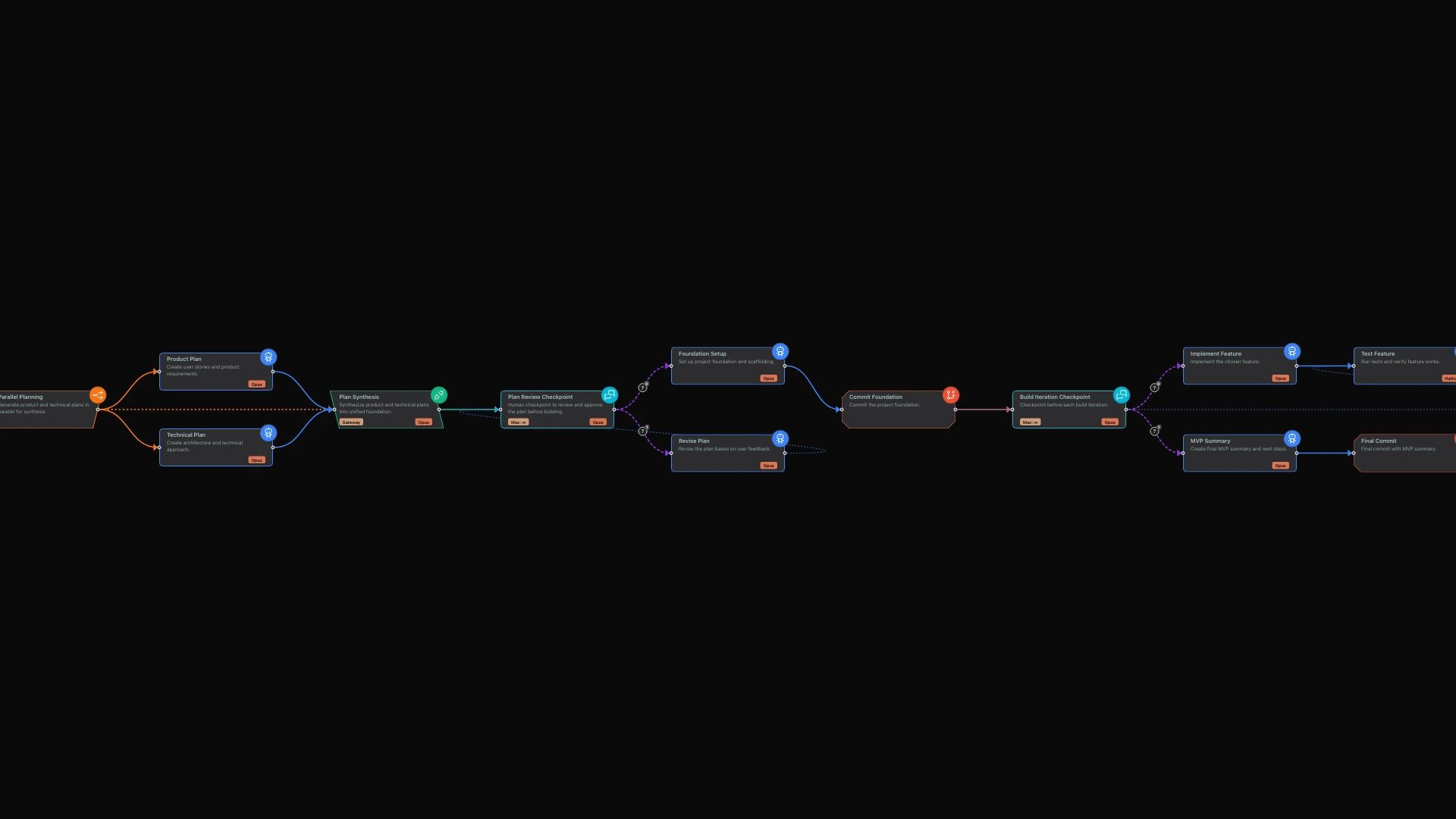
The limerIQ visual workflow editor lets you design your MVP journey as a series of connected phases. Think of it like a project roadmap that actually executes itself. Here is how the journey unfolds:
- Discovery - Capture the vision and validate scope
- Parallel Planning - Generate product and technical plans simultaneously
- Human Checkpoint - Review and approve before building
- Foundation Setup - Project scaffolding and structure
- Iterative Building - Build features with test-commit cycles
- MVP Summary - Wrap up with documentation
Let us explore each phase.
Phase 1: Discovery
Every great product starts with clarity. The workflow begins with a guided conversation that captures your idea. The AI takes on the role of a product manager, asking concise questions to understand what you are building.
During this conversation, you will explore questions like: What problem does this solve and for whom? What does success look like for your MVP? Do you have technical preferences or constraints? What is your timeline?
This is not just typing into a void. The AI is actively helping you clarify your thinking, probing for gaps in your vision and ensuring you have considered the essentials before moving forward.
The conversation stays focused through built-in guardrails. If you start veering into solution design before the problem is clear, the system gently redirects you. Focus on capturing the core idea first. Solutions come later.
Phase 2: Parallel Planning with Synthesis
Here is where limerIQ's power becomes evident. Instead of sequential planning where you define the product first and then figure out the technology, limerIQ runs both planning tracks in parallel.
While a product-focused AI persona drafts your product requirements document and user stories, a technical architect persona simultaneously designs your system architecture and makes technology recommendations.
Both perspectives develop independently, bringing their own expertise to bear. When complete, a synthesis step reads from both plans and creates a unified foundation that incorporates the best thinking from each track.
This parallel approach does more than save time. It produces better plans. The product requirements inform the architecture. The technical constraints shape the product scope. You get a cohesive foundation rather than plans that conflict with each other.
Phase 3: Human Checkpoint
This is where you stay in control. Before any code is written, the workflow pauses for your approval. You see a summary of everything the AI has produced: the product idea as captured, the number of features planned, the recommended tech stack, and the estimated development time.
Human checkpoints are non-negotiable in limerIQ workflows. They give you the opportunity to review what the AI produced, request changes if something is off, and maintain creative control over your product.
If you are not satisfied, the workflow routes to a revision step. Make your feedback, and the AI incorporates it. The loop continues until you approve the plan. Only then does implementation begin.
This is not AI running wild. This is AI augmenting your decision-making while you remain the final authority on your product.
Phase 4: Foundation Setup
With the plan approved, the workflow sets up your project foundation. A developer persona takes over, creating the project structure, configuring dependencies, establishing your folder hierarchy, setting up the testing framework, and writing the initial README.
Critically, no features are implemented yet. The AI creates only the skeleton, ensuring a clean baseline that all subsequent work builds upon. This separation of foundation from features prevents the common mistake of mixing setup code with business logic.
Every step is committed to version control with meaningful commit messages. Your git history tells the story of how your project came to be, making it easy to understand and navigate later.
Phase 5: Iterative Building
This is the heart of the workflow. Instead of building everything at once, limerIQ uses an iterative loop that mirrors how experienced developers actually work.
At each iteration checkpoint, you decide what happens next. Build the next planned feature? Jump to a specific feature from your list? Or stop here because the foundation is ready?
Each build iteration follows a test-commit cycle. First, the AI implements the feature. Then it verifies the implementation works through automated testing. If issues arise, it loops back to fix them until tests pass. Only after verification does it commit the progress and update the documentation.
This pattern ensures every feature is tested before committing, progress is tracked continuously, and you can stop at any point with a working product. You are not waiting until the end to discover something is broken.
Phase 6: MVP Summary
When you decide to stop building, the workflow wraps up with comprehensive documentation. The AI creates a summary that captures what was built, which features were implemented, what technical decisions were made, what was deferred for later, how to deploy and run the project, and suggested next steps.
This is often the documentation that solo developers skip when they are tired and want to ship. By automating it, you ensure your future self or potential collaborators can understand what was built and why.
Key Patterns for Solo Developers
The workflow demonstrates several patterns worth adopting in your own development practice.
Parallel planning with synthesis runs multiple perspectives simultaneously, then combines the best ideas. You get richer plans in less time.
Human checkpoints at decision points ensure AI never makes irreversible decisions without your approval. You stay in control of the creative direction.
Iterative building with test-commit cycles builds incrementally with validation at each step. Small, verified progress beats big, uncertain leaps.
Documentation as code treats documentation as a required output, not an afterthought. If the docs do not exist, the step is not complete.
Scope creep guards keep AI focused on the current phase. The product manager persona does not start designing databases. The architect does not start writing user stories.
Getting Started
To use this workflow, open the limerIQ visual editor and create a new workflow from the solo-idea-to-mvp template. The editor shows you each phase as a connected node, making it easy to understand the flow and customize it for your needs.
Describe your idea when prompted. Something like "Build a habit tracking app for people who want to build better routines" gives the AI enough context to begin the discovery conversation.
The workflow guides you through each phase, pausing for your input at checkpoints. You are never more than one approval away from understanding exactly what happens next.
What You Accomplish
By the end of a single workflow run, you will have:
- A validated product idea with clear scope
- Product requirements, user stories, and acceptance criteria
- Architecture documentation and technology decisions
- A fully scaffolded project with tests
- One or more implemented features
- Git history with meaningful commits
- Comprehensive documentation
This is what used to take a team weeks, accomplished by one developer in a weekend.
Beyond the MVP
Once your MVP is live and collecting feedback, limerIQ supports your next phases. Feature development workflows help you add capabilities based on user feedback. Refactoring workflows help you clean up technical debt with confidence. CI/CD integration automates your deployment pipeline.
The same patterns that helped you build the MVP scale to ongoing development.
Conclusion
Solo developers do not need to work alone. With limerIQ, you get a team of AI specialists working on your project, each bringing a different perspective, while you maintain creative control through strategic checkpoints.
The workflow we explored is not magic. It is structured collaboration between human judgment and AI capability. You decide what to build. AI helps you think through the implications and executes the tedious parts.
Your next idea is waiting. Let's build it.
Resources:
Next in Series: "Parallel Thinking: How Competitive AI Planning Produces Better Architectures"