
Iteration Without Developers: How Non-Technical Founders Ship Features
A complete guide to building products when coding is not your superpower
You have the vision. You know your market. You understand what customers need. But between your idea and a working product sits a wall that feels impossible to scale alone: writing code.
The traditional founder's dilemma is brutal. Either learn to code (months of distraction from your actual business), hire expensive developers (burn through runway before product-market fit), or partner with a technical co-founder (giving up equity and control). Each path has real costs.
What if you could build products without any of those trade-offs?
The Non-Technical Founder's Hidden Advantage
Here is a counterintuitive truth: non-technical founders often have clearer product vision than technical founders. You are not distracted by implementation details, architecture debates, or the temptation to over-engineer. You think in terms of user problems and business outcomes.
The challenge has never been your ideas. It has been translating those ideas into working software.
limerIQ bridges that gap by letting you describe what you want in plain language, then guiding you through every decision point while AI handles the technical execution.
How It Works: The Guided MVP Builder
The founder-friendly workflow operates through a series of conversations. At each stage, you are presented with clear options, asked simple questions, and given the power to approve or redirect. No technical jargon required.
Stage 1: Describe Your Vision
You start by describing your product idea the same way you would explain it to a potential customer or investor:
"I want to build a tool that helps freelancers track their invoices and get paid faster. They should be able to send professional invoices, track who has paid, and send automatic payment reminders."
The system asks clarifying questions in plain language:
- Who exactly will use this? What is their biggest frustration today?
- How will you know if this succeeds? What does winning look like?
- What is the one thing this absolutely must do to be useful?
- What should this NOT do (at least for now)?
You answer conversationally. No forms to fill out. No templates to follow.
Stage 2: Review the Plan
Based on your conversation, the system generates a product plan written in language you can understand. Not technical specifications, but clear descriptions of what will be built:
Example output:
Feature: Invoice Creation
Users can create professional invoices by entering client name, items/services, amounts, and due date. The invoice shows a total and can be sent via email with one click.Success Criteria:
- A freelancer can create and send their first invoice in under 3 minutes
- Invoices look professional and include all legal requirements
- Clients receive the invoice via email with clear payment instructions
You review each feature. Does this match your vision? Is anything missing? Is anything here that you do not want yet? You approve, request changes, or ask for clarification.
Stage 3: Watch It Come Together
Once you approve the plan, the system begins building. But you are not left in the dark. At regular checkpoints, you see progress:
Checkpoint: Invoice Form Complete
What was built:
- Form to enter invoice details
- Preview of how the invoice will look
- Validation to prevent common mistakes
Ready to continue to email sending, or want to see this working first?
You decide the pace. Want to test each piece before moving on? Say so. Want to move faster? Approve and continue. The workflow adapts to your preferred working style.
Stage 4: Test and Refine
Before any feature is marked complete, you test it. Not by reading code or running technical tests, but by using the product as your customers would:
"Try creating an invoice for a $500 consulting project. Does the form make sense? Does the preview look professional? Is anything confusing?"
If something is not right, you describe the problem in plain language:
"The invoice preview does not show my business name anywhere. It needs my company logo and name at the top."
The system understands and makes the change.
The Checkpoint Pattern: Control Without Micromanagement
The secret to this workflow is the checkpoint pattern. You are always in control, but you are not bogged down in details.
| Checkpoint | What You Decide |
|---|---|
| Vision Capture | Is the scope right? What is essential? |
| Plan Review | Does this match what you imagined? |
| Feature Preview | Does this work the way users expect? |
| Testing Results | Is this ready for real users? |
| Release Decision | Ship now or iterate more? |
Between checkpoints, AI handles execution. At checkpoints, you make strategic decisions. This mirrors how the best technical co-founders work: they do not ask you to approve every line of code, they present options and respect your product judgment.
Real Examples: What Founders Have Built
Sarah - Appointment Scheduling for Therapists
Sarah is a licensed therapist who wanted a scheduling tool tailored to mental health practitioners. Existing tools did not handle recurring appointments well or respect the specific privacy requirements of therapy practice.
Using the guided MVP workflow:
- Day 1: Described the vision, reviewed the plan
- Day 2-3: Built core scheduling with checkpoints every few hours
- Day 4: Tested with two therapist friends, gathered feedback
- Day 5: Refined based on feedback, deployed to a custom domain
Sarah now has 40 paying customers and has not written a single line of code.
Marcus - Inventory Management for Food Trucks
Marcus runs three food trucks and was tired of spreadsheets for tracking inventory and knowing when to reorder supplies. He described what he needed in a 15-minute conversation:
"I need to scan what we use each day, and it should tell me when we are running low on something before we actually run out."
The workflow built exactly that. Marcus approved each feature as it was completed, tested it during an actual service day, and requested two changes:
- Make the buttons bigger (hard to tap with gloves on)
- Add a "we're out" emergency button
Both changes were implemented within the same session.
The Visual Workflow Experience
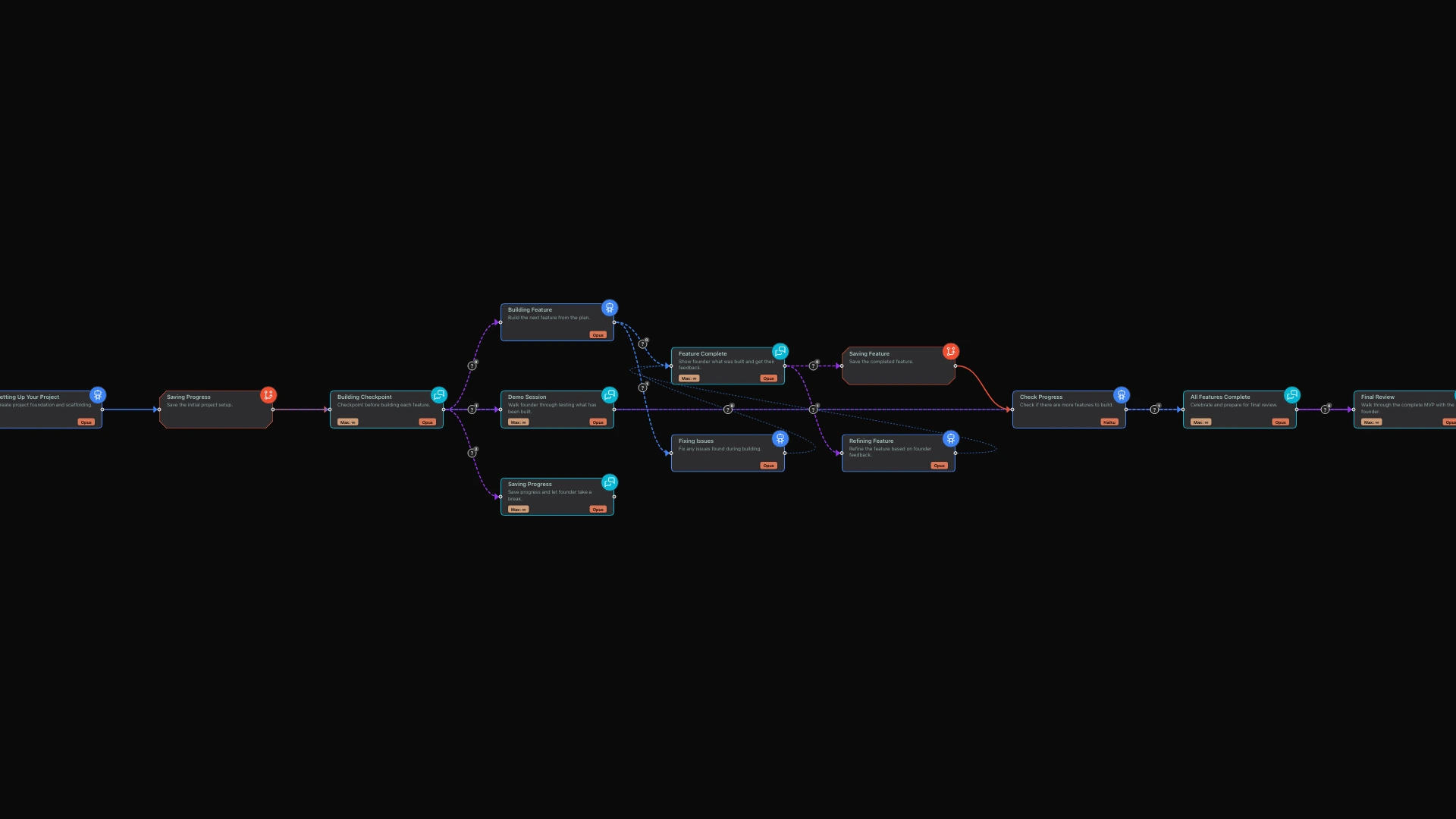
In limerIQ's visual editor, non-technical founders can see exactly what the building process looks like. Each stage is clearly labeled with what happens and what decision you will make. There is no hidden complexity, no mysterious processes running in the background.
When you run the workflow, the visual interface shows:
- Which stage is currently active
- What has been completed
- Where your input is needed
- Progress toward your finished product
For founders who have felt excluded from the technical side of product building, this transparency is liberating. You finally understand what is happening, even if you do not understand how it happens.
Getting Started: Your First Session
Ready to try the guided MVP builder?
- Open the workflow in limerIQ's visual editor
- Describe your idea in plain language when prompted
- Answer the clarifying questions honestly
- Review the generated plan and approve or adjust
- Watch progress at each checkpoint
- Test features as they complete
- Ship when ready
The first session typically takes 2-4 hours for a simple MVP. Complex products may take multiple sessions over several days, but you control the pace.
Why This Changes Everything
For non-technical founders, limerIQ is not just a productivity tool. It is access. Access to build your vision without:
- Waiting for developer availability
- Explaining technical requirements you do not fully understand
- Watching months of work produce something that is not quite right
- Burning through capital before you can validate the idea
You already have the hard part: the insight, the market knowledge, the customer understanding. Now you have the execution capability to match.
Your customers are waiting for your solution. They do not care whether you wrote the code yourself. They care whether the product solves their problem.
With limerIQ, you can find out.
Related articles: