
Building Your Second Brain: How limerIQ Documentation Scaffolding Prevents Knowledge Loss
For Solo Developers and Indie Hackers who work on multiple projects
You close your laptop after shipping a feature. Three months later, you return to the same project. The code is there, the tests pass, but you have no idea why you structured the authentication that way, what the workaround for that third-party API quirk was, or where you left off.
This is knowledge loss, and it is the silent tax that solo developers pay on every project they touch.
The Solo Developer's Memory Problem
When you work alone, you are the entire team. You are the architect, the developer, the QA engineer, and the documentation writer. But there is a problem: you are also the only person who remembers why things are the way they are.
Documentation seems like the obvious solution. But solo developers rarely have time to maintain comprehensive docs. You write a README when you start. Maybe you add some inline comments. Then you move on to the next feature, the next project, the next client.
When you return months later, you face the same questions:
- What is the current state of this project?
- What did I learn while building this that I should not forget?
- Why did I make that architectural decision?
The documentation you wrote at the start is now stale. The inline comments cover implementation details but not the reasoning. Your institutional knowledge exists only in your head, and your head has moved on to other things.
The Second Brain Pattern
limerIQ solves this with what we call the "second brain" pattern. Instead of relying on sporadic manual documentation, you let the AI maintain three living documents that capture everything you need to remember.
CURRENT-STATE.md answers "What is this project right now?" It tracks current capabilities, project structure, technical stack, and recent changes. When you return after months away, this is your orientation guide.
KEY-LEARNINGS.md answers "What did I learn building this?" It captures patterns that worked, gotchas and workarounds, performance insights, and development tips. This is your institutional knowledge, the things you would tell your future self.
DECISIONS-LOG.md answers "Why did I do it this way?" It records technology choices, architectural decisions, trade-offs accepted, and decisions deferred. When you question your past choices, this document explains them.
Together, these three documents form a second brain for your project. They are a persistent memory that survives the gaps between development sessions.
How the Second Brain Works
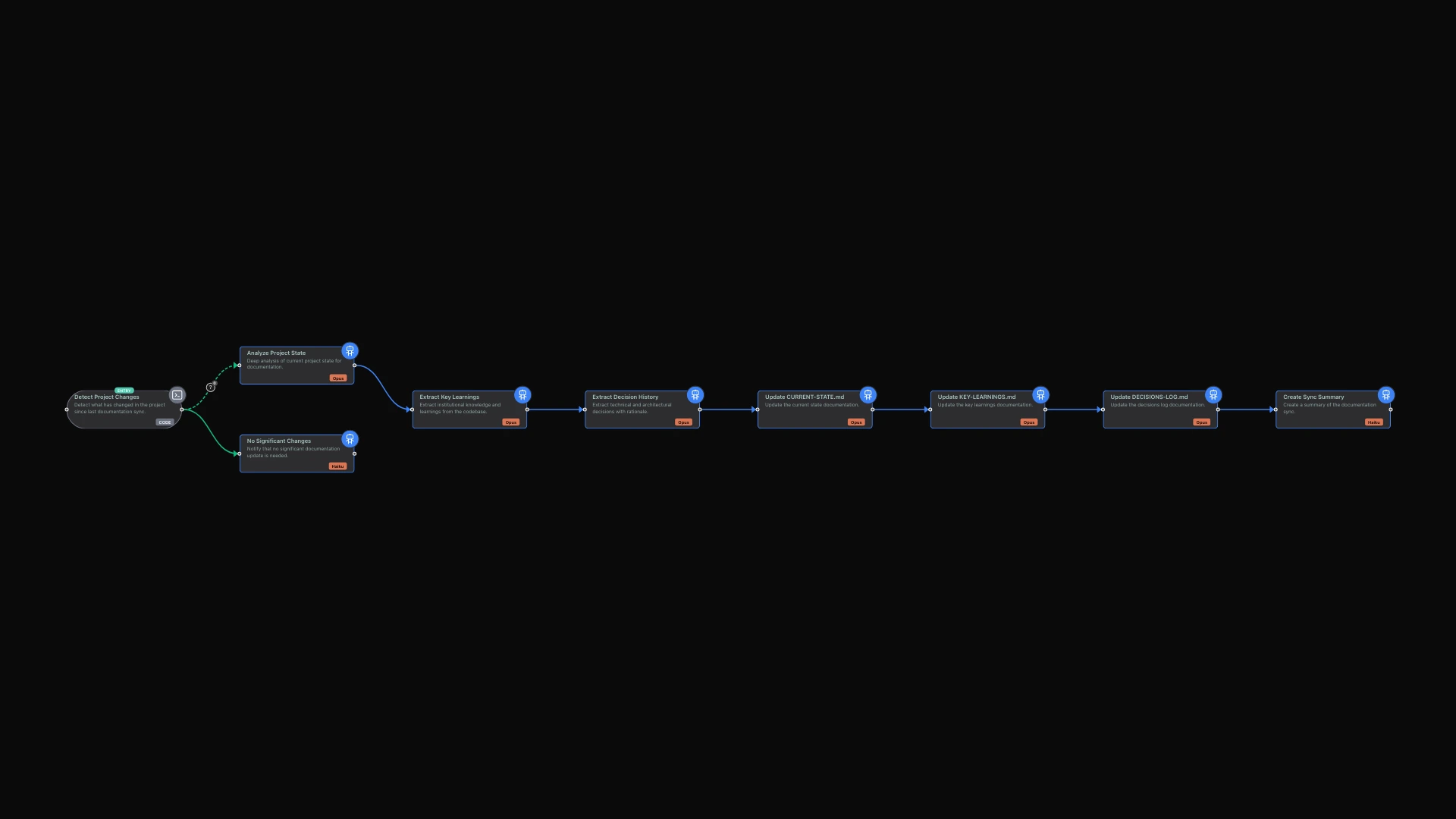
The limerIQ visual workflow editor makes it easy to design documentation workflows that keep your second brain current. Here is how a typical sync unfolds.
Phase 1: Detect Changes
The workflow starts by scanning your recent git history to identify what has changed since the last documentation sync. It looks at commits, changed files, and the nature of the changes.
If there are no significant changes, the workflow exits early. No point regenerating documentation when nothing has changed. This keeps the process efficient and cost-effective.
Phase 2: Analyze Your Codebase
When meaningful changes are detected, the workflow performs deep analysis. It examines your current project structure and capabilities. It identifies patterns, gotchas, and tips embedded in your code. It extracts technology and architecture decisions from your implementation choices.
This analysis uses sophisticated AI reasoning because it needs to understand not just what your code does, but why it does it that way. The system reads your code, understands your patterns, and extracts the knowledge you would otherwise lose.
Phase 3: Update Your Documents
With analysis complete, the workflow updates each of your three core documents. CURRENT-STATE.md gets refreshed with your latest capabilities and structure. KEY-LEARNINGS.md captures new patterns and gotchas. DECISIONS-LOG.md records any new architectural choices.
The workflow ensures documentation actually gets created. If a document update does not happen, the step fails and automatically retries. This creates a compliance loop: the AI cannot proceed until the documentation exists.
This is the critical difference from manual documentation. You are not hoping someone remembers to update docs. You are requiring that docs stay current before moving forward.
Phase 4: Summarize the Sync
Finally, the workflow creates a summary letting you know what was updated and when you should run the sync again. You get visibility into what your second brain now knows.
What Gets Captured
When you run the sync workflow against a real project, the documents capture surprisingly useful context.
Your CURRENT-STATE.md might include sections like:
Current Capabilities: REST API with user authentication using JWT, PostgreSQL database with 12 tables, background job processing via Redis queues, email notifications via a third-party service.
Recent Changes: Added rate limiting middleware last Tuesday, migrated from one web framework to another the previous week, added a caching layer before that.
Your KEY-LEARNINGS.md might capture entries like:
Email Service Rate Limits: Documenting that the third-party email service returns errors under high load, the solution involves batching emails with exponential backoff, and noting that their API rate limits are lower than documented.
Your DECISIONS-LOG.md might record entries like:
Framework Migration: Recording the date, the decision to migrate from one framework to another, the alternatives considered, the rationale (performance improvement needed for scaling), and the trade-offs accepted (lost some middleware compatibility).
This is the knowledge that would otherwise live only in your head.
Running Your Second Brain
You can trigger a second brain sync whenever you have been making changes. The workflow analyzes your recent commits and updates all three documents. For ongoing projects, running weekly or before stepping away for extended periods keeps your knowledge base current.
You can also integrate the sync with your version control workflow. Automatically sync after significant commits, ensuring documentation stays current without requiring you to remember.
The visual workflow editor shows you each phase of the sync process. You can see how change detection leads to analysis, how analysis feeds into document updates, and how everything converges to a summary. Customize any step for your specific documentation needs.
Beyond Manual Documentation
The second brain pattern represents a shift in how solo developers handle documentation. Instead of documentation being something you write when you have time (which is never), it becomes an automated part of your development workflow.
When you return to a project after months away:
- Read CURRENT-STATE.md to orient yourself
- Check DECISIONS-LOG.md when you question past choices
- Review KEY-LEARNINGS.md before tackling similar problems
Your past self documented everything. Your future self benefits from that knowledge.
The cost of running these sync workflows is minimal. Change detection uses lightweight analysis. Only significant changes trigger full documentation updates. And the value of preserved knowledge far exceeds the cost of generating it.
The Compound Value of Documentation
Each sync adds to your project's institutional knowledge. Over time, your second brain becomes increasingly valuable.
After six months, you have a comprehensive history of decisions and their rationale. After a year, you have a knowledge base that would take weeks to recreate manually. If you ever bring on collaborators or hand off the project, they get immediate context that would otherwise require extensive interviews with you.
This is not just about remembering. It is about building an asset that grows more valuable over time.
Getting Started
Open the limerIQ visual workflow editor and explore the second brain template. You will see how the workflow flows from change detection through analysis to document updates.
Run the workflow against one of your existing projects. Watch as it analyzes your codebase and generates initial documentation. Review what it captures and customize the templates if needed.
Then make it a habit. Weekly syncs take minutes but preserve months of context. Never lose project knowledge again.
What's Next?
The second brain is one piece of the solo developer toolkit. For a complete MVP-building workflow that includes planning, architecture, and iterative development, see From Idea to MVP in a Weekend: How limerIQ Turns Solo Developers into Small Armies. For handling the context-switching that comes with multiple projects, explore Stop Context-Switching: Let Your AI Team Handle the Boring Parts.