
Stop Context-Switching: Let Your AI Team Handle the Boring Parts
How limerIQ's parallel workflows free solo developers from the productivity trap
Every solo developer knows the feeling. You are deep in flow, building something beautiful, when suddenly you remember: the tests. The linting. The documentation that has been stale for three weeks. And just like that, your creative momentum evaporates.
Context-switching is the silent killer of solo developer productivity. Research suggests we lose up to 40% of our productive time to task-switching overhead. For indie hackers and solo developers, this is not just an inconvenience. It is the difference between shipping and stagnating.
What if you could delegate all those "boring parts" to an AI team that handles them in parallel while you stay focused on the work that matters?
The Context-Switching Tax
When you are a one-person team, you are also the QA team, the DevOps team, and the documentation team. Every time you context-switch between creative coding and maintenance tasks, you pay a cognitive tax:
- Setup time: Remembering where you left off with tests
- Mental context loading: Switching from "builder" mode to "reviewer" mode
- Recovery time: Getting back into flow after the interruption
Multiply this across linting, testing, documentation updates, and code review, and you have lost hours before lunch.
The Parallel Solution
limerIQ's parallel workflow capability lets you run multiple maintenance tasks simultaneously while you focus on creative work. Instead of the traditional sequential approach where you write code, wait for the linter, fix lint issues, wait for tests, update docs, and finally review results, you get a streamlined experience.
With limerIQ, you write your code as usual. Then you kick off a parallel maintenance workflow. While the AI handles linting, testing, and documentation updates simultaneously, you continue your creative work. When everything finishes, you review a single aggregated report that tells you exactly what needs attention.
The time savings compound quickly. Running three five-minute tasks in parallel takes five minutes, not fifteen. More importantly, you never break your flow.
How Parallel Maintenance Works
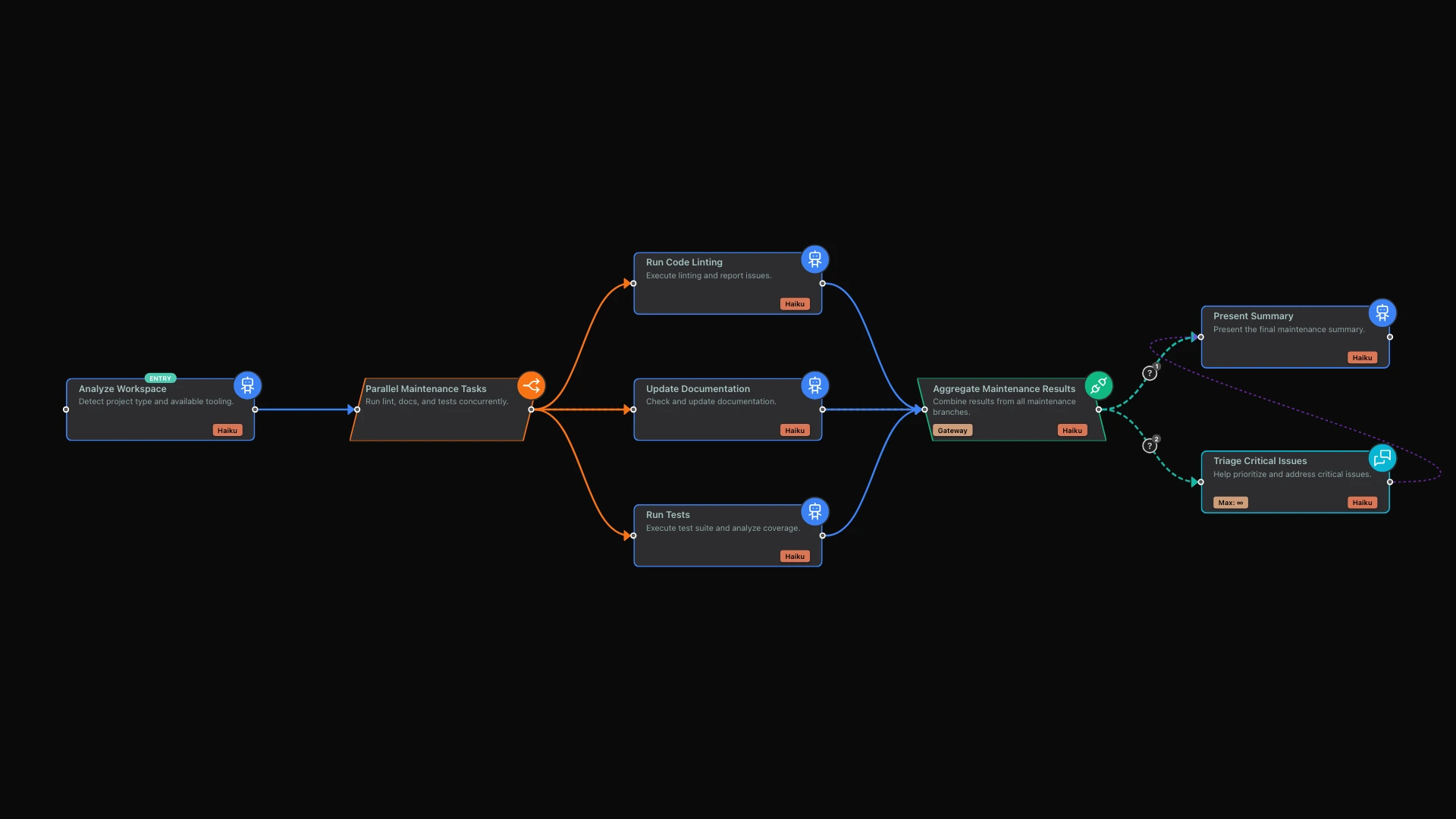
The limerIQ visual workflow editor makes it easy to design parallel workflows. You create a central hub that distributes work across multiple branches, and each branch executes independently before results flow back to a synthesis point.
Here is how a typical maintenance workflow unfolds.
First, the system analyzes your project to understand its structure. What language or framework are you using? What lint tools are configured? What test commands are available? Where does your documentation live? This quick scan takes seconds and uses the most cost-efficient AI model since it only needs to detect file presence.
Next, the workflow fans out into parallel branches. Linting runs in one branch, checking your code style and catching common errors. Testing runs in another branch, executing your test suite and capturing results. Documentation review runs in a third branch, identifying what is stale and suggesting updates.
All three branches execute at the same time. They do not wait for each other. They do not interfere with each other. They just run.
Finally, an integration step combines all results into a single, actionable summary. You see an overall health status at a glance: green, yellow, or red. You get a list of quick wins, the easy fixes you can knock out in minutes. You see items that need more attention, with clear explanations of what is wrong and how to fix it.
Why This Matters for Solo Developers
Batch Your Maintenance
Instead of interrupting your creative work every time you remember to run tests, schedule maintenance workflows at natural breakpoints. Before lunch. End of day. Before a commit. The workflow handles everything in parallel and gives you a single summary to review.
Never Miss the Boring Stuff
When maintenance tasks run automatically, you do not forget them. Documentation stays current. Tests actually run. Linting happens before the PR, not during code review when it is embarrassing.
Scale Your Output
A solo developer using parallel workflows can match the maintenance coverage of a small team. Three AI agents working in parallel do not get tired, do not need coffee breaks, and do not complain about running the test suite again.
Cost-Conscious by Design
You might wonder about the cost of running multiple AI agents. limerIQ addresses this by matching the model to the task complexity.
Routine maintenance tasks like running a linter and summarizing results do not need heavyweight reasoning. They need speed and efficiency. limerIQ uses the fastest, most cost-effective models for these tasks, keeping your AI costs low while still delivering real value.
Creative architecture decisions, on the other hand, might warrant more sophisticated reasoning. The system lets you specify which model fits which task, so you only pay for the intelligence you actually need.
This is a key principle: match the model to the task complexity. For routine maintenance, speed and cost-efficiency matter more than deep analysis.
Beyond Maintenance
The parallel workflow pattern extends far beyond maintenance tasks. Solo developers use it for many scenarios.
Parallel code review runs security, performance, and style checks simultaneously. Instead of waiting for one type of review to finish before starting another, you get all perspectives at once.
Multi-perspective planning gathers architecture suggestions from multiple AI personas, then synthesizes the best ideas. Want both a security-focused perspective and a performance-focused perspective? Run them in parallel and combine the insights.
Competitive analysis researches competitors in parallel, then aggregates findings. Each branch can focus on a different competitor, and the synthesis step identifies patterns across all of them.
Any task where you need multiple independent analyses can benefit from parallel execution.
The Productivity Multiplier
Stop treating context-switching as inevitable. With limerIQ's parallel workflows, you can delegate maintenance tasks to AI agents, keep your creative momentum intact, and get comprehensive coverage without comprehensive distraction.
The boring parts still get done. You just do not have to do them yourself.
The visual workflow editor makes it easy to design these parallel flows. You can see exactly how work distributes and converges. You can customize which tasks run in parallel and how results combine. And you can save your workflows as templates for future use.
Getting Started
Open the limerIQ visual editor and explore the parallel maintenance template. You will see how the workflow fans out into multiple branches and converges at a synthesis point. Run it against your own project to experience the difference.
Watch as your project health improves without constant manual attention. See how much more you accomplish when maintenance happens in the background instead of interrupting your creative flow.
The context-switching tax is optional. With the right tools, you can stop paying it.
Next in the series: "The $0 DevOps Team: Automated Deployment Workflows for Bootstrappers" - how to build enterprise-grade CI/CD without enterprise budgets.