Debug Like a Pro: Hot-Reload, Model Swapping, and Session Resume
Master advanced limerIQ debugging techniques in one comprehensive workflow. Learn how to leverage session resume for mid-flight iteration, hot-reload YAML without restarting, swap models on the fly fo
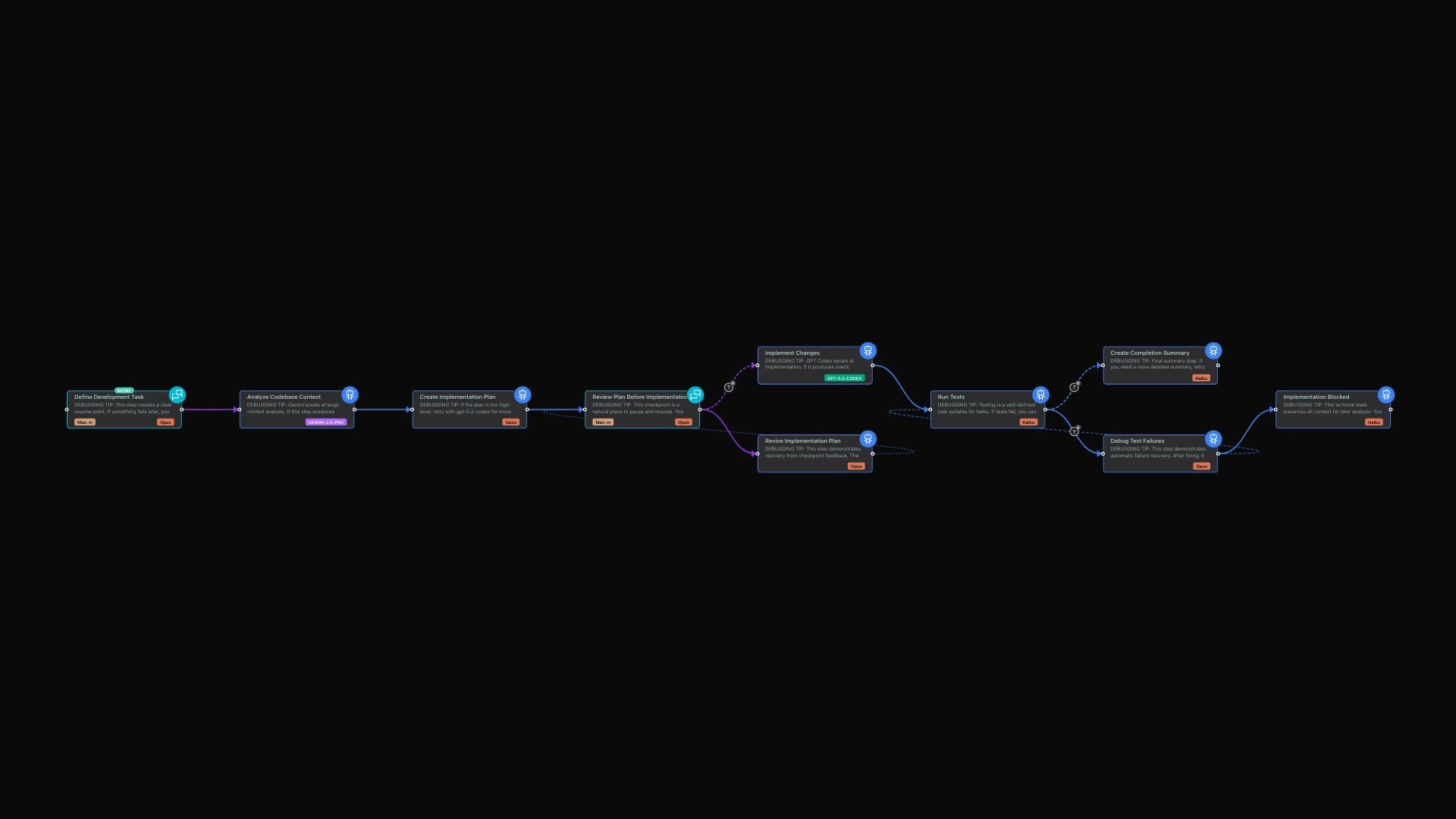
AI workflow orchestration sounds elegant in theory: define your steps, wire them together, let the AI execute. In practice, workflows fail. Models hallucinate. Context gets exhausted. Requirements change mid-flight. The difference between a toy orchestration system and a production-grade one lies in what happens when things go wrong.
limerIQ was built with debugging as a first-class concern. This article explores four capabilities that transform workflow debugging from painful archaeology into rapid iteration: session resume, workflow hot-reload, model retry with swapping, and cross-provider flexibility.
The Debugging Problem in AI Orchestration
Traditional workflow systems treat execution as a monolithic transaction. Start, run to completion, succeed or fail. When something goes wrong at step 7 of a 12-step workflow, you face an unpleasant choice: restart from the beginning (losing time and money) or manually patch state (risking inconsistency).
AI workflows make this worse. Each step might cost real money in API calls. Context windows fill up unpredictably. A model that works perfectly for 99 prompts might hallucinate on the 100th. And unlike deterministic code, you cannot simply "step through" an AI reasoning process to find the bug.
limerIQ addresses these challenges with a debugging-first architecture that assumes things will go wrong and provides the tools to recover gracefully.
Session Resume: Pick Up Where You Left Off
Every workflow execution creates a session with persistent state. When a step fails, when context exhausts, or when you simply need to pause and return later, the session preserves everything: all values produced by completed steps, all execution progress, the complete state of the workflow.
How It Works
When you resume a session, the system restores this state and continues from exactly where execution stopped. No re-running completed steps. No re-incurring costs for work already done. You resume at the point of interruption with full context intact.
This matters enormously for long-running workflows. A feature development workflow might run for an hour. If it fails at the final review step, you do not want to re-run discovery, architecture, planning, and implementation. You want to fix the review step issue and continue.
Designing for Resume Points
The most effective workflows include clear resume points -- places where state is fully captured and resuming makes sense. Interactive checkpoints are natural resume points: the workflow pauses for human input, and if you need to stop and return later, you resume at that checkpoint.
Similarly, phase boundaries work well as resume points. After discovery completes, all discovery outputs are captured. After implementation completes, all implementation outputs are captured. If something fails in review, you can resume from the review phase with discovery and implementation work intact.
Hot-Reload: Fix Workflows Without Starting Over
Traditional orchestration systems treat workflow definitions as immutable during execution. limerIQ takes a different approach: you can modify the workflow while execution is paused, and the changes take effect on resume.
When Hot-Reload Helps
Consider a common scenario: you are running a development workflow, and at the review checkpoint, you realize the implementation plan missed a critical requirement. With hot-reload:
- Pause at the interactive checkpoint
- Modify the workflow to add a new step or change instructions
- Resume the session
- The modified workflow applies to remaining steps
This is particularly powerful for:
- Iterative refinement: Adjust instructions based on output quality you have observed
- Scope changes: Add steps discovered to be necessary during execution
- Model optimization: Change model assignments based on observed performance
- Bug fixes: Correct instruction issues without losing progress
Hot-Reload Constraints
Hot-reload works within limits. Completed steps are fixed -- you cannot change what already ran. New steps must work with outputs that already exist. Adding or removing connections can invalidate execution position if done carelessly.
The best practice is to design workflows with clear phase boundaries where hot-reload is safe. Interactive checkpoints are natural hot-reload points: execution is paused, state is captured, and you can safely modify what comes next.
Model Swapping: The Right Model for Each Attempt
Sometimes a step fails not because of a workflow bug, but because the model produced a poor result. Maybe it hallucinated. Maybe it took an unexpected approach. Maybe the complexity level was wrong for the task.
limerIQ provides the ability to retry any step with a different model while preserving all other state.
Strategic Model Selection
Different models excel at different tasks:
| Task Type | Strong Choices | When to Consider Alternatives |
|---|---|---|
| User interaction | Claude Opus | Rarely needs change |
| Large context analysis | Gemini Pro | Claude for deeper reasoning |
| Implementation | GPT Codex | Claude for clarity, Haiku for speed |
| Testing and validation | Haiku | Claude for complex failure analysis |
| Planning | Claude Opus | GPT for technical depth |
When a step produces poor output, consider whether a different model might handle that specific task better. Implementation that is overly complex? Try a model known for cleaner code. Analysis that misses nuance? Try a model with stronger reasoning. Task that is simple but slow? Try a faster, more economical model.
Thinking Level Adjustments
Beyond model swapping, you can adjust reasoning depth on retry. Higher thinking levels provide deeper analysis but cost more and take longer. If a step produces verbose or over-analyzed output, retrying with reduced thinking often yields more focused results.
Lower thinking levels are faster and more economical. If a step is simple but using high thinking, switching to lower thinking might produce equivalent results more efficiently.
Cross-Provider Flexibility
Skills are reusable expertise packages that can be incorporated into workflow steps. What makes this particularly powerful is that skills work across different AI providers -- Claude, GPT, and Gemini.
Why This Matters
When you invest time creating specialized knowledge that teaches AI how to handle your specific needs -- your team's coding standards, your security requirements, your documentation patterns -- that investment should not be locked to any single provider.
With cross-provider skills:
- Provider flexibility: Switch models without losing specialized knowledge
- Team standardization: Same expertise across all team workflows regardless of model choice
- Cost optimization: Use expensive models with skills only where the task demands it
If a skill is missing for a selected provider, you get a clear warning rather than silent failure. Workflows can gracefully degrade when skills are optional, while failing clearly when skills are required.
The Debug Loop in Practice
Here is how these capabilities combine in practice:
- Start execution: Run the workflow with your initial input
- Monitor progress: The visual subway map shows real-time step status
- Encounter an issue: A step fails or produces poor output
- Diagnose: Review the step output in the dashboard
- Choose a remedy:
- Retry same model: Transient issue, try again
- Retry different model: Model mismatch, swap to alternative
- Hot-reload: Instruction issue, modify workflow and resume
- Session resume: Need more information, pause and return later
- Continue: Resume execution from the appropriate point
- Iterate: Repeat until workflow completes successfully
The key insight is that debugging becomes iterative rather than all-or-nothing. You do not restart from the beginning when something goes wrong at step 7. You diagnose, adjust, and continue from step 7 with full context and multiple recovery options.
Designing for Debuggability
Create Clear Resume Points
Structure workflows with phase boundaries where state is fully captured. Interactive checkpoints naturally create resume points. Phase transitions (discovery to planning, planning to implementation) are good resume boundaries.
Document Model Choices
When designing workflows, consider which models are best for each step -- and what alternatives might work. This documentation helps when debugging: if a step underperforms, you know what alternatives to try.
Use Interactive Checkpoints Strategically
Insert human review points before expensive or critical steps. These checkpoints serve double duty: they provide human oversight, and they create natural pause points for hot-reload and session resume.
Create Failure Recovery Paths
Design workflows with explicit paths for when things go wrong. Instead of failing completely, route to a recovery step that analyzes what happened and attempts correction. If automated recovery fails, route to a terminal state that preserves all context for human analysis.
Set Appropriate Retry Limits
Match automatic retry attempts to step criticality. Critical steps benefit from more retry opportunities. Simple steps need fewer. Set limits that reflect how important success is and how likely retries are to help.
Conclusion
Debugging AI workflows requires different tools than debugging traditional code. You cannot step through an AI's reasoning. You cannot set breakpoints in a model's attention mechanism. But you can build systems that assume failure and provide graceful recovery.
Session resume preserves state across failures, so you never lose completed work. Hot-reload lets you fix workflows without starting over, so instruction improvements do not require re-running everything. Model swapping turns model mismatch from a failure into an opportunity, so you can find the right model for each task. Cross-provider flexibility makes expertise portable, so your investments in specialized knowledge pay off regardless of which provider you use.
Together, these capabilities transform workflow debugging from archaeological excavation into rapid, iterative refinement. When your workflow fails at step 7, you do not restart from step 1. You diagnose, adjust, and continue from step 7 with full context and multiple recovery options.
Debug like a pro. Let limerIQ handle the infrastructure.
Related Articles:
- See Your Workflow Think: The Visual Editor - Monitor execution progress visually
- Set It and Forget It: Compliance Checks - Automatic verification and self-healing execution
- The Workflow Architect: AI That Designs AI - Build workflows designed for debuggability