
From User Story to Working Code: The Intent-to-Plan-to-Build Pipeline
How PMs can drive technical output without writing a single line of code
You have a product vision. You know what your users need. But between that vision and working software sits a chasm of technical translation, specification writing, and developer handoffs. Each step introduces delays, misunderstandings, and scope drift.
What if you could describe your product intent in plain language and watch it transform into a complete product plan, detailed user stories, and eventually working code?
That is the intent-to-plan-to-build pipeline, and it puts PMs back in the driver's seat.
The Traditional PM Bottleneck
The classic product development cycle looks like this:
- PM writes PRD - Hours spent crafting the perfect document
- Engineering reviews - Back-and-forth on feasibility and scope
- User stories created - More writing, more alignment meetings
- Acceptance criteria defined - Often incomplete, discovered late
- Development begins - Requirements drift as reality meets spec
- QA discovers gaps - Missing test cases, unclear success criteria
Each handoff loses context. Each delay costs momentum. And the PM spends more time documenting and coordinating than actually thinking about the product.
A Better Way: Intent-First Development
With limerIQ, you start with intent and let AI orchestration handle the heavy lifting. Here is how the pipeline works.
Phase 1: Capture Your Intent
You describe what you want to build in conversational terms. Not a formal document. Not a spec. Just your product vision:
"We need a customer feedback widget that can be embedded on any page. Users should be able to submit quick ratings (1-5 stars) or longer text feedback. We want to capture sentiment automatically and route urgent issues to our support team."
The system asks clarifying questions through a friendly conversation:
- What does success look like for this feature?
- Who are the primary users?
- Any technical constraints or integrations?
- What should stay off the table for this release?
You answer in plain language. The AI captures structured data from your responses, building a foundation for everything that follows.
Phase 2: Automatic Discovery and Documentation
Based on your intent, the system generates a complete documentation package:
- PRD (Product Requirements Document) - Structured from your conversation
- User Stories - 8-15 stories with acceptance criteria
- Acceptance Tests - Testable conditions mapped to each story
- Test Plan - Coverage strategy across unit, integration, and E2E
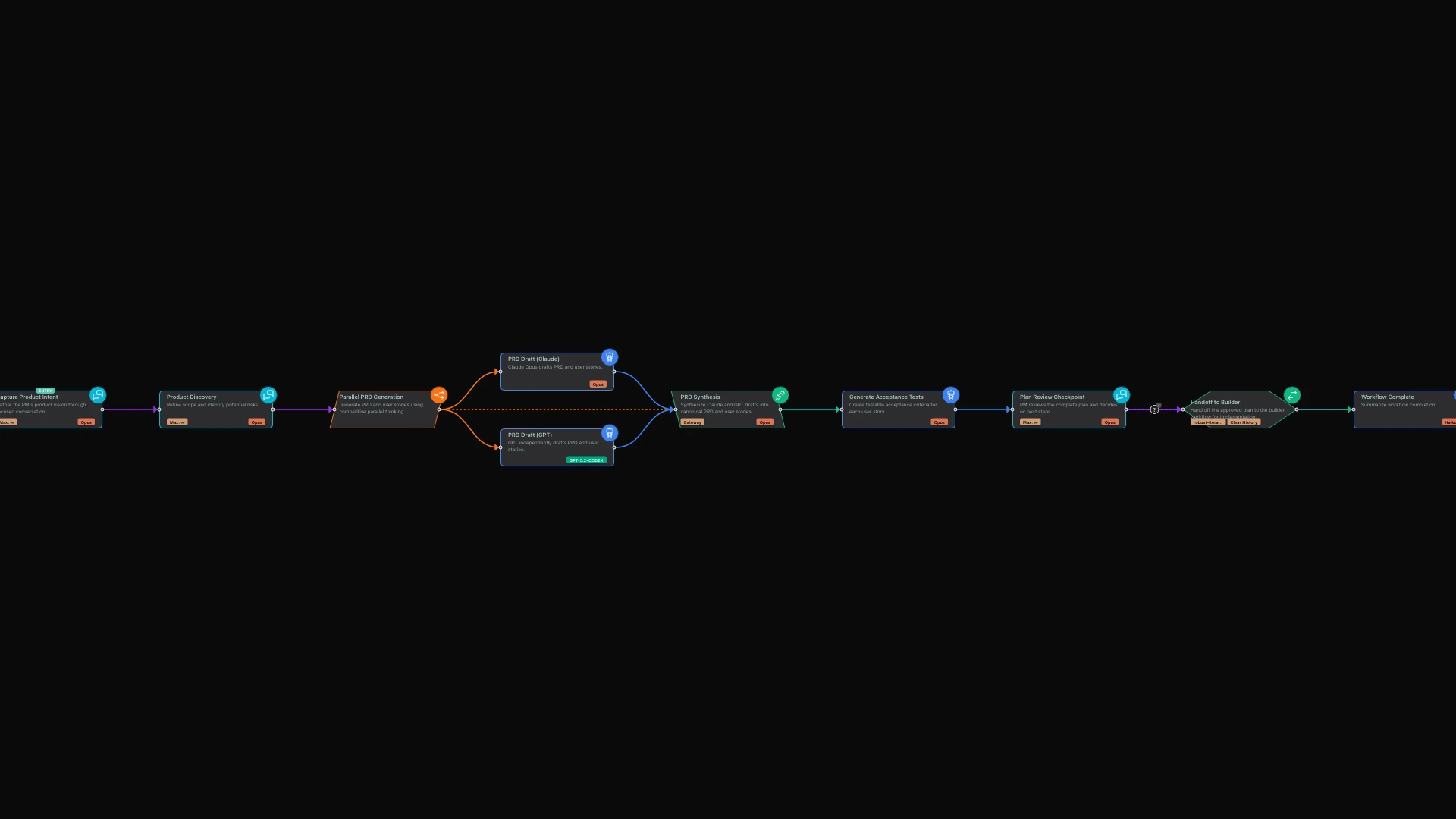
Here is where it gets interesting: the workflow uses parallel competitive thinking. Two different AI perspectives independently draft these documents, then a synthesis step combines the best elements from each. This eliminates blind spots and produces more robust specifications than any single pass could achieve.
Phase 3: Human Checkpoints (Your Control Points)
The pipeline includes strategic checkpoints where you review and approve. At each checkpoint, the system presents its work and waits for your direction:
"Here is the generated PRD and the twelve user stories I created. Review them and let me know: Are the user stories complete? Do the acceptance tests capture what success looks like? Ready to proceed to development?"
You are not micromanaging. You are making strategic decisions at the right moments. Approve the plan, request changes, or pause to gather more input. The workflow waits for your signal before moving forward.
Phase 4: Handoff to Builder
Once you approve, the workflow seamlessly transitions to a builder workflow that implements your plan. The handoff includes everything the builder needs:
- The complete PRD and user stories
- Acceptance tests as the definition of done
- Architecture recommendations
- Risk register with mitigations
The builder receives full context. Nothing is lost in translation. When it completes a sprint, it reports back with what was built and which tests are passing.
What PMs Actually Control
This is not about removing PMs from the process. It is about amplifying their leverage. Here are your control points:
| Control Point | What You Decide |
|---|---|
| Intent Intake | Product vision, success metrics, constraints |
| Discovery | Scope boundaries, non-goals, target users |
| Market Research | Whether to include competitive analysis |
| Prerequisites | External dependencies and setup requirements |
| Plan Review | Final approval of PRD and user stories |
| Handoff Decision | Proceed to build or iterate on plan |
Each checkpoint respects your decisions. The workflow does not proceed until you give the signal.
The Visual Workflow Experience
In limerIQ's visual editor, you can see the entire pipeline laid out as connected stages. Each stage shows its purpose, its inputs, and its outputs. You can follow the flow from intent capture through documentation generation to builder handoff.
When you run the workflow, progress indicators show which stage is active. When a checkpoint arrives, you receive a clear notification and can respond directly in the interface. The visual representation makes the entire process transparent and approachable.
For teams, this visibility is transformative. Stakeholders can see where in the pipeline a feature currently sits. Engineers understand exactly what documentation will arrive when the handoff occurs. Everyone operates from the same understanding of the process.
Real Results
A PM using this pipeline can:
- Go from idea to detailed plan in under an hour - What used to take days of writing
- Get better plans - Competitive parallel thinking catches gaps single drafts miss
- Maintain control - Checkpoints ensure nothing proceeds without approval
- Reduce developer dependency - Planning happens independently; developers focus on building
- Ship faster - Acceptance tests are defined upfront, not discovered during QA
Organizations report reducing their planning phase from two weeks to two days while producing more comprehensive documentation. The ROI comes from both time savings and quality improvements.
Getting Started
To try the intent-to-plan-to-build pipeline:
- Open the workflow in limerIQ's visual editor
- Start with your product idea as the initial input
- Answer the discovery questions conversationally
- Review the generated plan at each checkpoint
- Approve handoff when ready to build
The workflow handles document generation, synthesis, and handoff coordination. You focus on product decisions.
The PM as Orchestrator
The best PMs are not typists. They are orchestrators who shape outcomes through strategic decisions. The intent-to-plan-to-build pipeline lets you operate at that level:
- Define intent, not specifications
- Review outputs, not write documents
- Make decisions, not coordinate meetings
- Ship products, not manage process
Your product vision deserves to move at the speed of your ideas. With limerIQ, it can.
Related articles: