
Infrastructure-as-Code Generation: From Architecture Diagrams to Terraform
Turn high-level architecture specifications into production-ready infrastructure code with best practices baked in.
As a DevOps or Platform Engineer, you have likely experienced the tedious process of translating architecture decisions into infrastructure code. Someone sketches a system on a whiteboard, and you spend days writing Terraform modules, Kubernetes manifests, and deployment pipelines. By the time you are done, the architecture has already changed.
What if you could describe your infrastructure at a high level and have production-ready code generated automatically, complete with security best practices, compliance controls, and proper documentation?
That is exactly what limerIQ enables. In this article, I will walk you through how our Infrastructure-as-Code generation workflow takes your architecture requirements and produces deployable Terraform and Kubernetes configurations.
The Traditional IaC Pain Points
Before diving into the solution, let us acknowledge the common frustrations:
- Requirements Translation: Converting architecture discussions into actual code is error-prone and time-consuming.
- Consistency: Different team members implement similar infrastructure differently.
- Best Practices: Security controls and compliance requirements are often afterthoughts.
- Documentation: Infrastructure documentation is perpetually out of sync with reality.
- Multi-Stack Coordination: Ensuring Terraform outputs align with Kubernetes expectations requires manual verification.
The limerIQ Approach: Conversation to Code
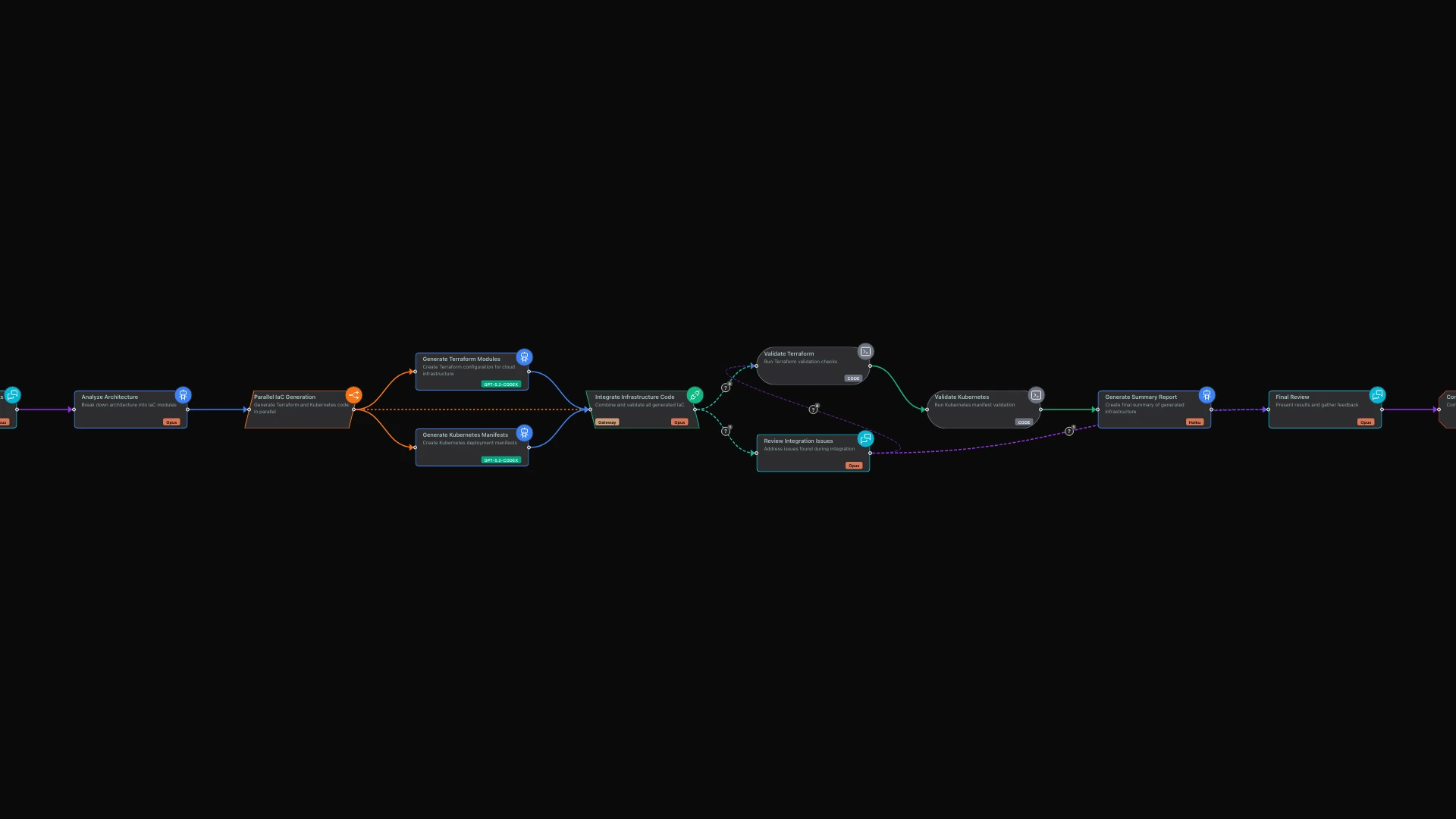
limerIQ solves these problems by orchestrating AI through a structured workflow. The visual workflow editor lets you see exactly how your infrastructure generation process flows, and each phase has a specific purpose that produces validated outputs.
Here is the journey from architecture idea to deployable code:
Architecture Input leads to Analysis, which feeds into Parallel Generation of both Terraform and Kubernetes code. These streams merge in an Integration phase, followed by Validation and finally Human Review.
Let me walk you through what happens at each stage.
Phase 1: Interactive Architecture Conversation
The workflow begins with an intelligent conversation that captures your infrastructure requirements. Unlike filling out a rigid form, this conversational approach lets you describe your architecture naturally.
The system asks about your cloud provider preferences, whether you are targeting AWS, GCP, Azure, or a multi-cloud setup. It explores your architecture type, distinguishing between microservices, monolithic applications, serverless designs, or hybrid approaches. The conversation covers the components you need, from compute and networking to storage and security.
It also digs into your scale requirements. What traffic volumes do you expect? How much data will you be handling? The system asks about your environment strategy, understanding how you want to separate development, staging, and production. If you have compliance requirements like HIPAA, PCI-DSS, or SOC2, it captures those too.
This is not just question-and-answer. The AI asks follow-up questions based on your responses. If you mention microservices, it asks about service discovery patterns. If you mention compliance requirements, it probes for specific controls you need.
The result is a comprehensive understanding of what you need, captured in a format that drives the rest of the workflow.
Phase 2: Architecture Analysis and Planning
Once your requirements are captured, the system performs a deep analysis to create a blueprint for code generation.
During this phase, the workflow breaks down your requirements into specific infrastructure modules. It determines which Terraform modules you will need, lists the Kubernetes resource types required, and maps out the dependency graph showing the order things must be provisioned.
The analysis also produces a best practices checklist tailored to your compliance requirements. All of this gets documented in an architecture analysis file that serves as both a record and a reference for the code generation that follows.
Phase 3: Parallel Code Generation
Here is where limerIQ truly shines. Instead of generating Terraform and Kubernetes code one after the other, the workflow runs them simultaneously.
On the Terraform side
The system generates production-ready Terraform code following established best practices. It creates a proper module structure with separate directories for networking, compute, storage, and security. Environment-specific configurations get organized so you can easily manage dev, staging, and production deployments.
The generated code uses variables for all configurable values, includes descriptions for every variable and output, implements least-privilege IAM policies, and configures remote state with locking. These are not afterthoughts; they are built in from the start.
On the Kubernetes side
Simultaneously, the workflow generates Kubernetes manifests following security best practices. It creates a directory structure using Kustomize, with a base configuration and overlays for each environment.
The generated manifests run containers as non-root users, use read-only root filesystems where possible, include NetworkPolicies for traffic control, and implement RBAC with minimal permissions. Again, security is baked in, not bolted on.
Phase 4: Integration and Validation
After both code generation streams complete, an integration phase ensures everything works together.
The system verifies that Terraform outputs match what Kubernetes expects. It creates integration files including CI/CD pipeline configurations and deployment documentation. The dependencies between Terraform and Kubernetes are clearly documented so your team understands the deployment order.
Validation checks run automatically to catch issues before you ever try to deploy. The system verifies that required files exist, that Terraform configurations are syntactically valid, and that Kubernetes manifests are well-formed. These are deterministic checks that catch problems early.
Phase 5: Human-in-the-Loop Review
The workflow ends with an interactive review session where you can examine everything that was generated.
The AI presents the complete infrastructure package and walks you through what was created. You can ask questions about specific design decisions, request modifications to the generated code, or approve the output for use. The AI can make changes directly to the files based on your feedback.
This checkpoint ensures that a human always has the final say before infrastructure code is committed. Automation handles the tedious work; you retain control over the outcome.
Best Practices Encoded in Every Generation
The workflow embeds best practices at every level:
Security by Default: IAM policies follow least-privilege principles. Containers run as non-root. NetworkPolicies are included. You do not have to remember to add these; they are part of the standard output.
Documentation Scaffolding: Every run produces architecture analysis documents, deployment guides, and generation summaries. Documentation is a byproduct of the process, not a separate task.
Environment Separation: Generated code supports development, staging, and production environments with Kustomize overlays. Environment-specific configuration is structured from the beginning.
Compliance Controls: The requirements you specified during the initial conversation are referenced throughout generation. Compliance is not an afterthought.
Validation Gates: Code and integration checks catch issues before deployment. Problems surface early when they are cheap to fix.
From Diagram to Deployable
What used to take days now happens in minutes:
- Describe your architecture through a natural conversation
- Watch as AI agents generate Terraform and Kubernetes code in parallel
- Review the integrated, validated output
- Commit production-ready infrastructure
The workflow is designed to be extended. You can add security scanning steps, cost estimation, or integrate with your existing CI/CD pipeline. The modular structure means you can swap components without rebuilding from scratch.
Try It Yourself
Open the workflow in the limerIQ VS Code extension to visualize the execution flow in real-time with the subway map view. Watch as each phase completes and see exactly what is happening at every step.
The complete workflow is available in the limerIQ repository. Clone it, run it, and see how limerIQ can transform your infrastructure provisioning process.