
Security Scanning Workflows: Shifting Left with AI-Powered Analysis
Target Audience: DevOps / Platform Engineers
Security is too often an afterthought. Vulnerabilities discovered in production are expensive. Vulnerabilities discovered in staging are disruptive. Vulnerabilities discovered during code review are manageable. Vulnerabilities caught before the code is even committed are cheap.
This is the promise of shift-left security: move security checks earlier in the development lifecycle where fixes are less costly and less disruptive.
The challenge is execution. Security scanning tools generate mountains of output. False positives dilute signal. Developers lack security expertise to prioritize findings. Remediation guidance is generic and often unhelpful for specific contexts.
limerIQ solves this by combining deterministic security scanning with AI-powered analysis and remediation. Automated scans produce consistent, repeatable results. Intelligent analysis interprets findings with contextual understanding. Security gates enforce policies automatically. Interactive guidance helps developers fix issues effectively.
The Shift-Left Security Problem
Traditional security pipelines suffer from three fundamental issues:
1. Late Discovery: Security scans run in CI/CD after code is committed. By the time vulnerabilities are found, the developer has moved on to other work. Context is lost. Fixes compete with new feature work.
2. Signal-to-Noise: Automated scanners produce extensive output with varying severity levels. Without domain expertise, developers treat all findings equally or ignore them entirely. Critical vulnerabilities hide among low-severity warnings.
3. Generic Remediation: Security tools suggest fixes, but those suggestions rarely account for application context. "Upgrade to version X" does not help when version X introduces breaking changes. Developers need guidance specific to their codebase.
limerIQ addresses each of these issues through a structured workflow approach.
The Security Scanning Pipeline
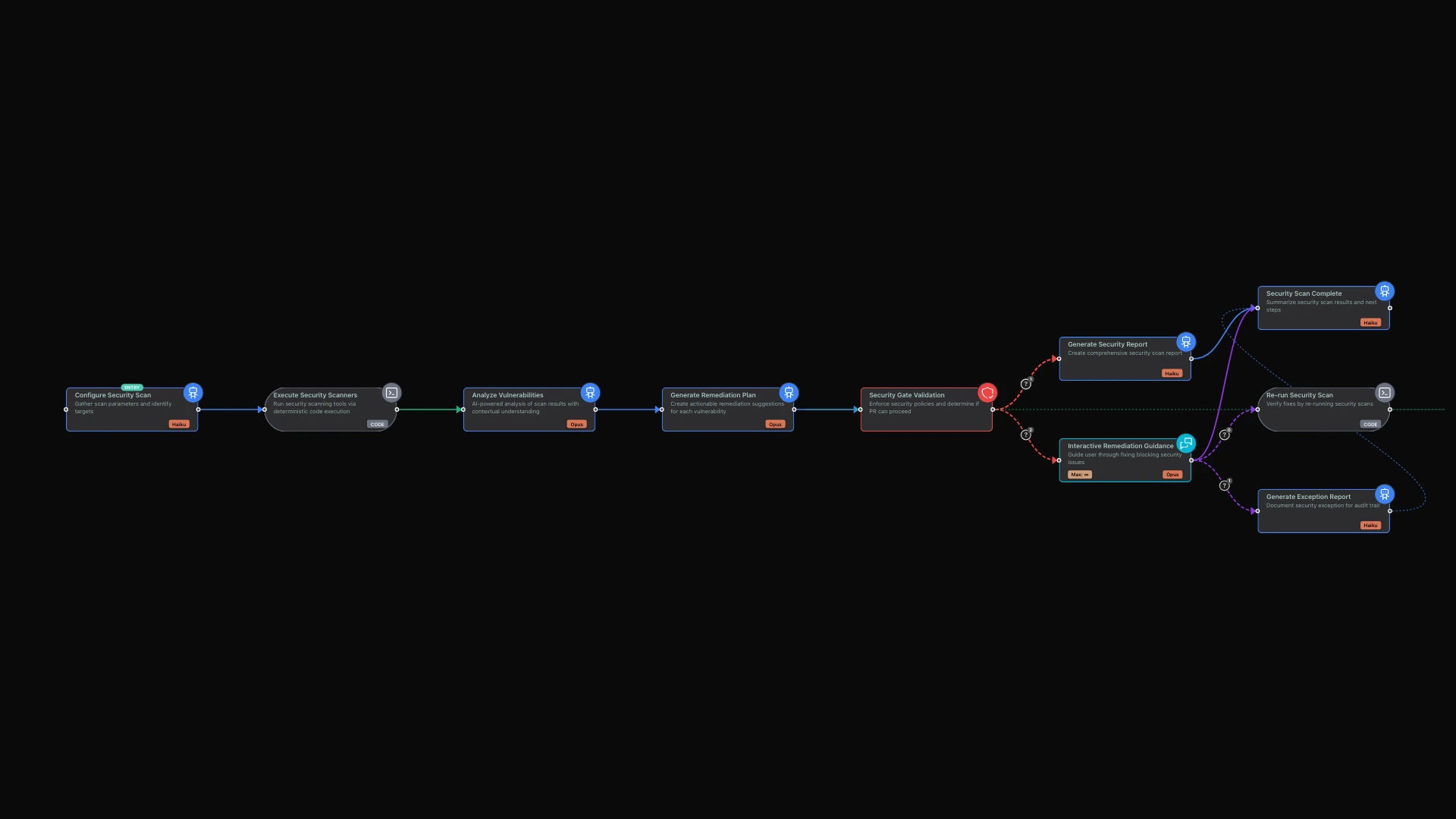
The workflow demonstrates a comprehensive security scanning process:
- Configure Scan: Analyze the codebase to determine which scanners should run
- Execute Scanners: Run security tools for consistent, repeatable results
- Analyze Vulnerabilities: Apply contextual understanding to findings
- Generate Remediation: Create actionable, context-aware fix suggestions
- Security Gate: Enforce policy thresholds before code can proceed
- Interactive Remediation: Guide developers through fixing blocking issues
This architecture separates concerns appropriately. Scanning is consistent and fast. Analysis leverages AI for contextual understanding. Gates enforce policy automatically. Remediation is interactive when human judgment is needed.
Phase 1: Intelligent Scan Configuration
Before running scanners, the workflow determines what to scan.
The system analyzes your repository to understand what is present. What programming languages are you using? What package managers? Are there infrastructure files like Terraform configurations or Kubernetes manifests? Do you have Dockerfiles?
Based on this analysis, it configures the appropriate scanners. A JavaScript project gets npm vulnerability scanning. A Python project gets pip dependency checks. Infrastructure code gets IaC security analysis. Docker containers get image scanning.
This adaptive approach means you run the right scans for your codebase without manual configuration. As your technology stack evolves, the security scanning adapts automatically.
Phase 2: Comprehensive Security Scanning
The core scanning phase runs multiple security checks across your codebase.
Dependency scanning examines your package files and lock files to identify known vulnerabilities in your dependencies. It checks npm packages, Python packages, Ruby gems, and other dependency sources against vulnerability databases.
Secret detection scans your code for accidentally committed secrets. It looks for API keys, access tokens, private keys, and other sensitive data that should not be in version control. The patterns are comprehensive, covering major cloud providers and common services.
Infrastructure scanning examines your Terraform files, Kubernetes manifests, and Dockerfiles for security misconfigurations. It catches issues like containers running as root, overly permissive IAM policies, and missing network security controls.
These scans produce consistent results. The same codebase will generate the same findings every time, making it easy to track progress and identify new issues.
Phase 3: Contextual Vulnerability Analysis
Raw scanner output needs interpretation. This is where intelligent analysis adds significant value.
The system prioritizes vulnerabilities by actual risk, not just severity labels. A critical vulnerability in a development dependency might be less urgent than a high-severity vulnerability in production code. The analysis considers exploitability, attack surface, and business impact.
It identifies likely false positives based on context. A SQL injection warning in a test file is different from one in production code. The analysis distinguishes between theoretical risks and practical concerns.
The system also performs attack chain analysis. Individual vulnerabilities might be low-risk, but combinations could be dangerous. The analysis identifies potential chains where multiple vulnerabilities together create significant risk.
All of this gets documented in a vulnerability analysis report that explains not just what was found, but what it means for your specific application.
Phase 4: Security Gate Enforcement
After analysis, the workflow enforces your security policies automatically.
You define your thresholds: perhaps zero critical vulnerabilities, no more than two high-severity issues, and no secrets detected. The security gate evaluates your scan results against these policies and makes a determination.
If your code passes the gate, it proceeds to reporting and can continue through your pipeline. If it fails, the workflow routes to interactive remediation to help developers fix the blocking issues.
This automated enforcement means security policies apply consistently. There is no negotiation, no "we'll fix it later." Code either meets the bar or it does not.
Phase 5: Interactive Remediation Guidance
When the security gate fails, developers need help fixing the issues.
The workflow enters an interactive mode where the AI guides you through remediation. It explains each blocking issue: what the vulnerability is, why it matters, and what needs to change.
For straightforward fixes, it provides specific guidance. The upgrade path for a vulnerable dependency, the configuration change for a Dockerfile, the code modification to eliminate a security weakness.
For complex issues, it helps you think through the tradeoffs. Sometimes the fix has implications for functionality or performance. The AI helps you understand the options and make informed decisions.
Throughout this process, you can ask questions and get clarification. The guidance is specific to your codebase and your vulnerabilities, not generic documentation.
Benefits of This Approach
Earlier Detection
Security issues surface before code is committed, not after. Developers fix problems while the context is fresh, while they remember why they made certain choices and how the code works.
Reduced False Positive Fatigue
Intelligent analysis filters noise from signal. Developers see the issues that actually matter, prioritized by real risk. They do not learn to ignore security findings because most of them are irrelevant.
Actionable Remediation
Generic advice like "upgrade dependency X" becomes specific guidance tailored to your codebase. Developers know exactly what to change and understand the implications of the change.
Consistent Policy Enforcement
Security gates apply the same standards to every change, regardless of who wrote it or when it was submitted. Policies are enforced automatically, not through manual review that might be inconsistent.
Developer Education
Interactive remediation teaches developers about security as they work. They learn why certain patterns are risky and how to write more secure code in the future.
The Visual Experience
Using the limerIQ visual workflow editor, you can watch the security pipeline progress. The subway map view shows configuration, scanning, analysis, and gate evaluation proceeding step by step.
When the gate fails, you see exactly what blocked it and why. The interactive remediation phase is visible, showing your conversation with the AI as you work through fixes.
Beyond Basic Scanning
Once you have the core security workflow running, you can extend it:
Compliance mapping connects findings to specific compliance requirements. You see not just vulnerabilities, but which SOC 2 controls, PCI-DSS requirements, or HIPAA safeguards they affect.
Trend analysis tracks your security posture over time. Are you getting more secure with each release? Are certain types of vulnerabilities recurring?
Dependency review provides deep analysis of new dependencies before they are added. What is the security history of this package? Who maintains it? Is it a wise addition to your codebase?
Infrastructure drift detection continuously scans deployed infrastructure, not just code. Your production environment stays aligned with your security policies.
Shift Left, Stay Secure
Security discovered late is security discovered expensively. By embedding security scanning into development workflows, you catch vulnerabilities when they are cheapest to fix.
limerIQ makes this practical by combining:
- Consistent scanning for reliable, repeatable results
- Intelligent analysis that understands your application context
- Automated gates for policy enforcement without manual review
- Interactive guidance for effective remediation
The result: security that happens automatically, analysis that provides real insight, and remediation that actually helps developers fix issues.