
The Self-Documenting Platform: Keeping DevOps Documentation Current
Target Audience: DevOps / Platform Engineers
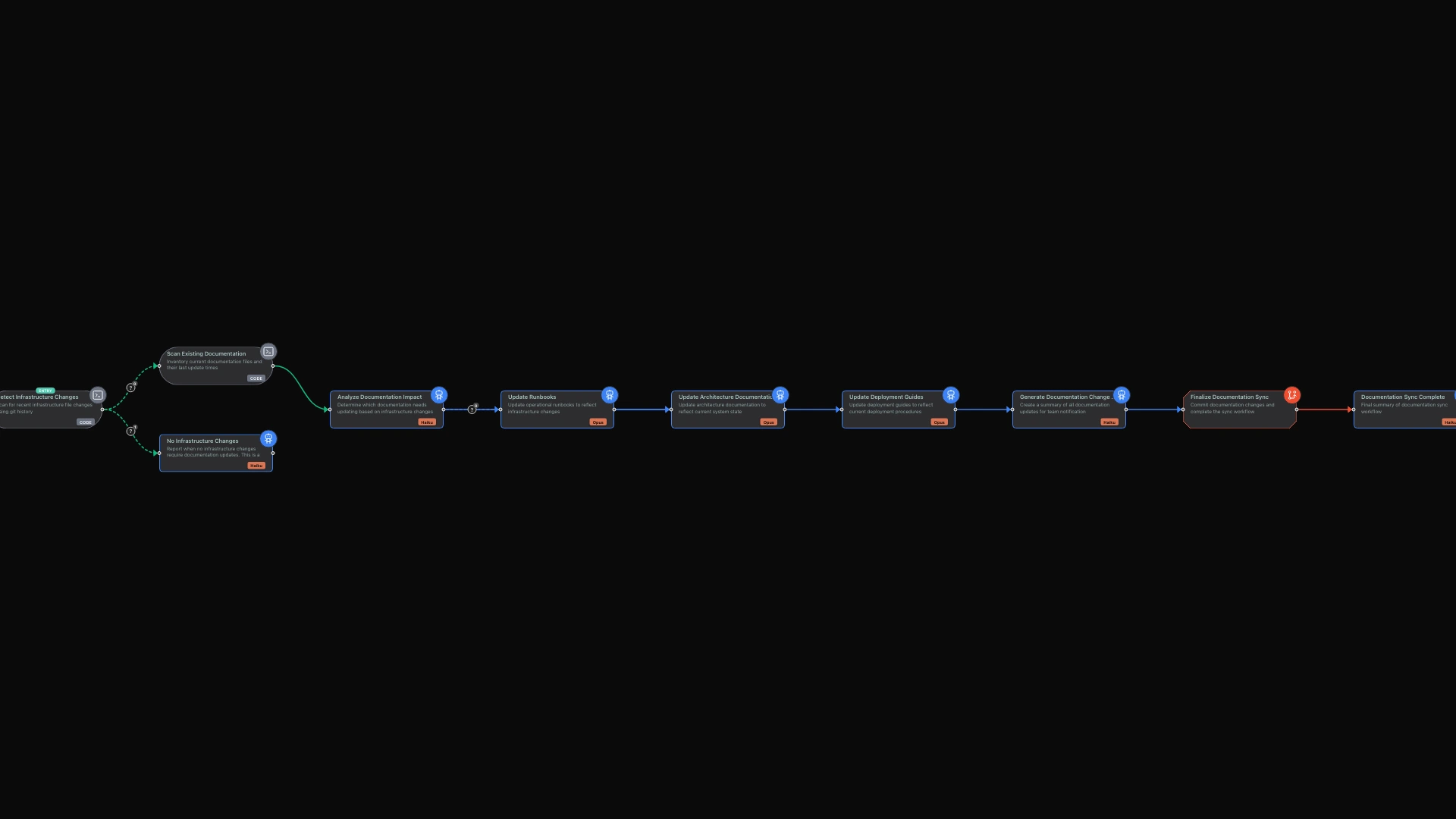
Documentation rot is the silent killer of operational reliability. You spend hours writing comprehensive runbooks after an incident, only to discover six months later that half the commands no longer work because someone renamed a service. Your architecture diagrams show a three-tier monolith while your production environment runs twelve microservices. The deployment guide references environment variables that were deprecated two sprints ago.
This is not a discipline problem. It is a tooling problem.
limerIQ solves documentation rot by treating documentation maintenance as an automated workflow rather than a manual chore. Instead of hoping developers remember to update docs after changes, you build workflows that detect drift and update documentation automatically.
The Documentation Drift Problem
Platform engineers face a unique documentation challenge. Unlike application code, infrastructure documentation spans multiple systems:
- Runbooks describe how to respond to incidents
- Architecture docs explain system relationships and data flows
- Deployment guides walk through release procedures
- Configuration references document environment variables and secrets
Each of these documents drifts at different rates. Runbooks become stale when monitoring tools change. Architecture docs lag behind when new services get added. Deployment guides break when CI/CD pipelines evolve.
The traditional approach is to schedule periodic documentation reviews. This creates busy work that competes with urgent operational priorities. The result: reviews get postponed indefinitely.
A Better Approach: Change-Driven Documentation
limerIQ enables a fundamentally different approach. Instead of reviewing documentation on a schedule, you update documentation when relevant code changes.
The workflow pattern is straightforward:
- Detect changes by comparing current infrastructure state against what is documented
- Identify drift by analyzing which documentation is affected by the changes
- Update docs by rewriting affected sections to match reality
- Verify accuracy by ensuring all critical documentation has been addressed
Here is how this looks in practice.
Phase 1: Detect Infrastructure Changes
The workflow begins by scanning for recent changes to your infrastructure code. It looks at your Terraform files, Kubernetes manifests, Dockerfiles, and CI/CD configurations to understand what has changed recently.
The system categorizes these changes automatically. Terraform changes might affect your architecture documentation. Kubernetes changes might impact deployment guides. Docker changes could require runbook updates. CI/CD changes might obsolete your release procedures.
This detection happens quickly and produces deterministic output. The same set of changes will always be categorized the same way, regardless of when you run the workflow.
Phase 2: Analyze Documentation Impact
Once changes are identified, the workflow determines which documentation needs attention.
The system reviews your runbooks, architecture documents, deployment guides, and configuration references. For each changed infrastructure file, it identifies which documentation references that component, what aspects of the documentation may be outdated, and how urgent the update is.
Updates get prioritized. A runbook change that could cause incident response failures gets flagged as critical. An architecture diagram update might be important but not urgent. This prioritization ensures you address the most impactful drift first.
The analysis is intelligent enough to understand relationships. If you renamed a service in your Kubernetes manifests, it knows to check for that service name in your runbooks, deployment guides, and monitoring documentation.
Phase 3: Update Documentation
With a prioritized list of affected documentation, the workflow updates each file to reflect current reality.
For each affected document, the system reads both the current documentation and the changed infrastructure files. It rewrites affected sections to match the actual current state of your infrastructure. Every updated document gets a timestamp showing when it was last verified.
The workflow enforces documentation standards. Commands in runbooks must be copy-pasteable. Environment variables must include their default values. Service names must match what is actually deployed. Links must point to current locations.
When the system cannot fully verify something, it flags it for manual review rather than guessing. You always know what was automatically updated and what still needs human attention.
Phase 4: Generate Change Summary
Finally, the workflow produces a summary of what changed, formatted for your team communication tools.
The summary includes what documents were updated, why they needed updating, and what changes triggered the updates. If anything requires manual verification, that gets called out clearly.
This summary can be posted to Slack, included in a pull request, or added to your team's changelog. Your entire team knows documentation was updated and can review the changes if needed.
Key Benefits of This Approach
Runbooks That Work at 3 AM
When your pager goes off in the middle of the night, the last thing you need is a runbook with commands that no longer work. Change-driven documentation means your runbooks stay synchronized with your actual infrastructure. The commands work because they were verified against current code.
Architecture Docs That Reflect Reality
New services get documented when they are added, not months later when someone finally gets around to it. Removed services get cleaned from the docs. Dependencies stay accurate. Your architecture documentation becomes a reliable reference rather than an optimistic history.
Deployment Guides That Actually Deploy
When CI/CD pipelines change, deployment documentation updates automatically. Environment variables stay current. Prerequisites remain accurate. New team members can follow the guide and actually deploy successfully.
Reduced Documentation Burden
Your team no longer needs to schedule documentation review sessions. The workflow handles routine updates automatically. Human effort focuses on creating new documentation and handling edge cases, not maintaining existing docs.
Beyond Basic Documentation
Once you have automated documentation sync working, you can extend the pattern:
- Cross-reference validation: Verify that architecture docs match actual service dependencies
- Runbook testing: Periodically verify runbook commands still work
- Configuration drift detection: Compare documented configs against live systems
- Documentation coverage reports: Identify undocumented services or procedures
The key insight is treating documentation as code that can be tested, validated, and automatically maintained.
The Visual Workflow Experience
Using the limerIQ visual workflow editor, you can see exactly how the documentation sync process flows. The subway map view shows each phase progressing, from change detection through analysis to documentation updates.
You can trigger the workflow on a schedule for regular documentation sync, or integrate it with your CI/CD pipeline to run whenever infrastructure changes land. Either way, you have visibility into what is happening and what was updated.
Stop Fighting Documentation Rot
Documentation rot is not inevitable. It is the result of treating documentation as a one-time activity rather than an ongoing process.
With limerIQ, you encode your documentation maintenance requirements into workflows that run automatically. Changes trigger updates. Compliance checks ensure completeness. Your documentation stays current without manual intervention.
The result: runbooks that work when you need them at 3 AM. Architecture docs that reflect reality. Deployment guides that actually deploy.