
The $0 DevOps Team: Automated Deployment Workflows for Bootstrappers
A complete, zero-cost CI/CD pipeline that automates deployments from git commits with built-in validation gates, semantic versioning, and automatic rollback capability. Perfect for indie hackers and s
Target Audience: Solo Developers, Indie Hackers, Bootstrapped Founders
The DevOps Tax on Solo Projects
Every indie hacker knows the moment: you have shipped an MVP, users are signing up, and now you need to deploy updates without breaking production. The traditional answer involves enterprise CI/CD platforms, dedicated DevOps engineers, or cobbled-together scripts that work until they do not.
GitHub Actions is free for public repos, but your side project is private. CircleCI's free tier runs out after your third deployment of the day. And the mental overhead of maintaining deployment infrastructure? That is time stolen from building features your users actually want.
What if you could have enterprise-grade deployment workflows that cost nothing to run, require no specialized knowledge, and handle the edge cases that usually catch solo developers off guard?
The limerIQ Approach: Intelligent Deployment Orchestration
limerIQ turns deployment automation into a guided experience. Instead of debugging mysterious pipeline failures at 2 AM, you describe what a successful deployment looks like and let the workflow handle the complexity.
The key insight: deployment is not just about running commands. It is about making decisions, handling failures gracefully, and knowing when to stop before causing damage.
What Enterprise-Grade Deployment Looks Like
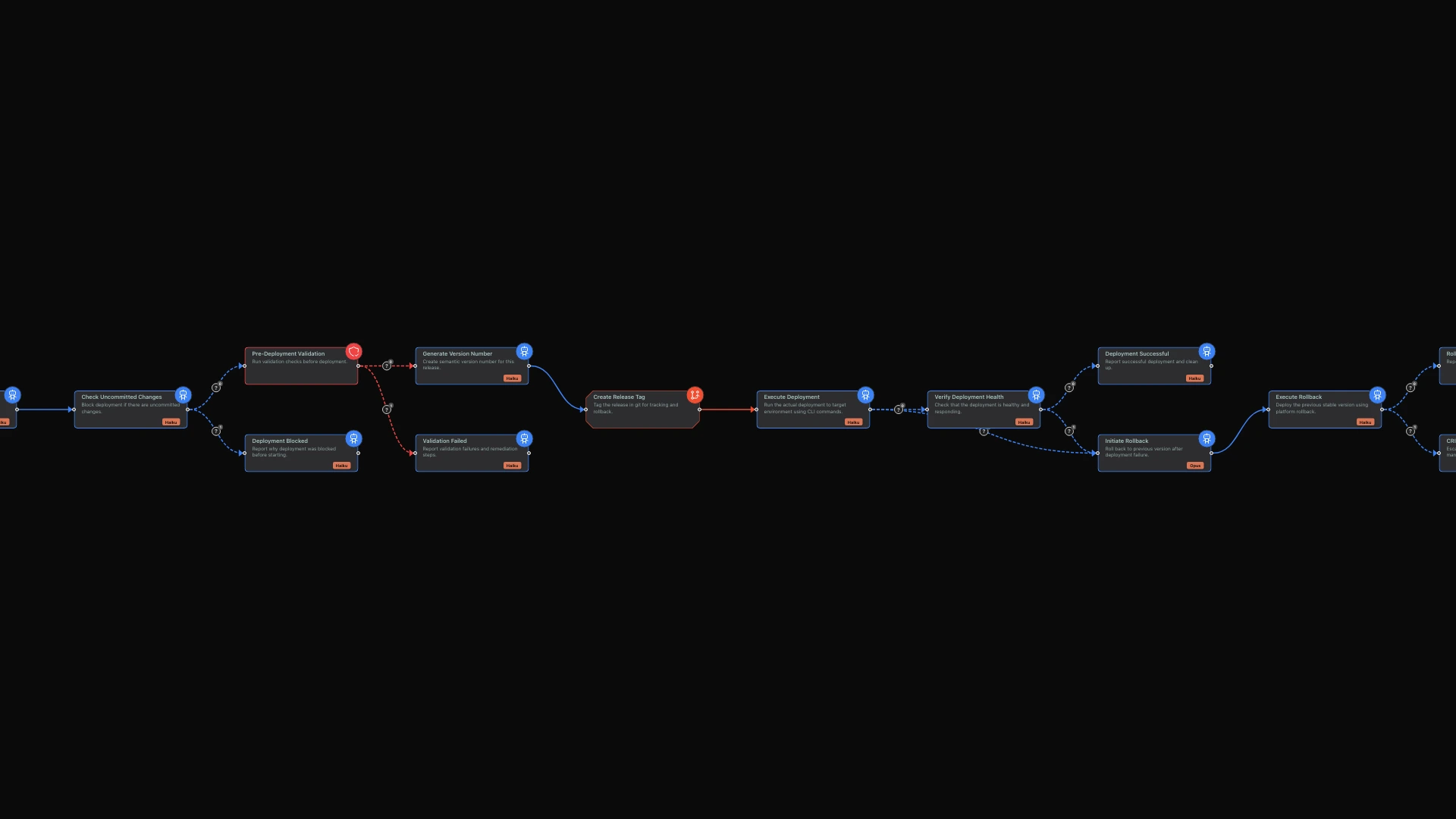
Using the limerIQ visual workflow editor, you can build a complete deploy-on-merge pipeline with four critical capabilities that enterprise teams pay thousands to achieve.
1. Pre-Deployment Validation Gates
Before any code touches production, the workflow runs validation checks. Think of these as your sober second thought before deployment.
The system verifies that all tests are passing, there are no uncommitted changes in your working directory, your git status is clean, and all required environment variables are present. These are the mistakes that usually surface at 3 AM: missing environment variables, uncommitted local changes, failing tests that slipped through.
By catching these issues before deployment begins, you avoid the painful experience of discovering problems after your users already have.
2. Intelligent Branch Management
The workflow understands version control. It can create deployment branches, tag releases, and manage the version history that makes rollbacks possible.
No more manual tagging ceremonies. No more "wait, what version is in production?" conversations with yourself. The system handles release versioning automatically, creating a clear audit trail of what was deployed and when.
3. Conditional Deployment with Rollback
Here is where the intelligence matters. The deployment process does not just blindly push code. It monitors the deployment, checks health endpoints, and triggers rollback if something goes wrong.
After pushing your code, the system verifies the new version is actually working. It checks that health endpoints respond correctly, the deployed version matches what was expected, smoke tests pass against production, and error rates stay within acceptable bounds during the first critical minutes.
If verification fails, the workflow does not panic. It transitions to a rollback step that restores the previous version and notifies you of what went wrong. You wake up to a notification explaining the issue, not to angry user emails.
4. Self-Healing Deployments
Traditional CI/CD pipelines continue until they hit an explicit failure. limerIQ workflows can branch based on any outcome, creating self-healing deployment processes.
If deployment succeeds, the workflow proceeds to verification. If verification succeeds, you get a success notification. If either step fails, the system automatically rolls back and alerts you with specific information about what went wrong.
This branching logic means your deployment pipeline adapts to circumstances rather than blindly following a fixed script.
The Cost Breakdown: Actually Zero Dollars
Let me be specific about what "zero dollar" means:
| Component | Traditional Cost | limerIQ Cost |
|---|---|---|
| CI/CD Platform | $15-50/month (private repos) | $0 |
| DevOps Engineer | $150K/year (fractional: $500/month) | $0 |
| Monitoring/Alerting | $20-100/month | $0 (built into workflow) |
| Deployment Scripts Maintenance | 4+ hours/month | Minimal (AI-maintained) |
The workflow runs on your local machine or a simple compute instance you already have. The AI tokens used during execution are minimal because deployments are infrequent and focused.
What Intelligent Workflows Handle That Scripts Cannot
Traditional deployment scripts are deterministic: they run the same commands regardless of context. limerIQ workflows understand context.
Scenario 1: Staging vs Production
The workflow adjusts its behavior based on the target environment. Staging deployments can skip certain validation steps and use less aggressive rollback thresholds. Production deployments require all gates to pass. Same workflow, different behavior based on context.
Scenario 2: First Deployment vs Updates
Initial deployments need database migrations, environment setup, and initialization scripts. Updates skip these. The workflow detects which scenario applies and adjusts automatically.
Scenario 3: Hotfix vs Feature Release
Hotfixes need fast-track validation that still catches critical issues. Feature releases go through the full validation suite. The workflow can infer the release type from branch naming conventions and act accordingly.
Building Your Pipeline
The limerIQ visual workflow editor makes it easy to design your deployment pipeline. You see each phase as a connected node: validation, deployment, verification, and rollback. You can customize the logic at each phase for your specific needs.
The workflow adapts to your deployment target. Whether you deploy to Vercel, Railway, a VPS, or Kubernetes, the orchestration layer remains the same. Only the specific deployment actions change.
Start by connecting your repository. The visual editor scans your project structure and suggests appropriate validation steps. Add your deployment credentials as secure environment variables. Then run the workflow against a staging environment to see how it handles both success and failure scenarios.
Beyond Basic Deployment
The visual workflow editor makes it easy to extend your pipeline. Here are extensions that take minutes to add:
Notifications
Add a notification step that posts deployment status to your team channel. Even as a solo developer, having a deployment log in Slack or Discord creates useful history.
Database Migrations
Insert a migration step before deployment that checks for pending migrations and runs them in the correct order. The workflow ensures migrations complete before the new code goes live.
Feature Flags
Add a step that enables feature flags after successful deployment, allowing gradual rollout of new functionality. Start with 10% of users and increase as confidence grows.
Scheduled Deployments
Wrap the workflow in a scheduler to deploy during low-traffic windows automatically. Friday afternoon deployments become a thing of the past.
The Bigger Picture: DevOps for Everyone
The DevOps movement promised that developers could own their deployment pipelines. In practice, it created a new specialty that most solo developers cannot afford. limerIQ makes good on that original promise.
You do not need to understand container orchestration manifests, infrastructure-as-code state files, or complex pipeline syntax. You need to describe what a successful deployment looks like, and the visual workflow editor helps you build the logic to get there.
This is not about replacing DevOps engineers for teams that can afford them. It is about giving indie hackers and bootstrapped founders access to the same deployment confidence that well-funded startups take for granted.
Getting Started
Open the limerIQ visual editor and explore the deployment pipeline template. You will see the flow from validation through deployment, verification, and rollback handling. Customize each step for your hosting platform and deployment process.
Try it against a staging environment first. See how the validation gates catch issues you would have deployed to production. Experience how the rollback capability provides a safety net. Then trust it with production deployments.
Your side project deserves enterprise-grade deployment infrastructure. Now you can have it without the enterprise price tag.
Related Articles: