
Shipping Features, Not Fixing Bugs: Quality Gates for One-Person Teams
Automate your code quality checks with a comprehensive pre-commit quality gate that runs tests, linting, security scans, and type checking in parallel. This workflow detects your project configuration
Published: January 2026
Author: limerIQ Team
Category: Tutorial
Tags: solo-developer, indie-hacker, quality-assurance, validation, pre-commit
You ship a feature at midnight. The next morning, you wake to bug reports. Users found edge cases you did not test. The linter caught issues you ignored. A dependency has a known vulnerability.
Sound familiar?
Solo developers face a brutal trade-off: move fast and break things, or slow down and test everything manually. Enterprise teams have dedicated QA engineers, security reviewers, and automated pipelines. You have yourself and a deadline.
What if you could have enterprise-grade quality gates without the enterprise overhead?
The Quality Gate Problem
Quality assurance is not glamorous work. It requires discipline, repetition, and attention to detail. For solo developers, the temptation to skip steps is overwhelming:
- "I tested it locally, it should be fine"
- "The linter is just being picky"
- "Security scans take too long"
- "I will write tests after launch"
Each shortcut saves time now but creates problems later. Bug fixes interrupt feature development. Security vulnerabilities force emergency patches. Technical debt compounds until the codebase becomes unmaintainable.
The solution is not more discipline. It is automation that enforces quality without requiring constant vigilance.
Quality Gates with limerIQ
limerIQ enables pre-commit quality gates that run multiple checks in parallel, analyze results intelligently, and provide clear pass/fail decisions. The workflow acts as your automated QA team, catching issues before they reach production.
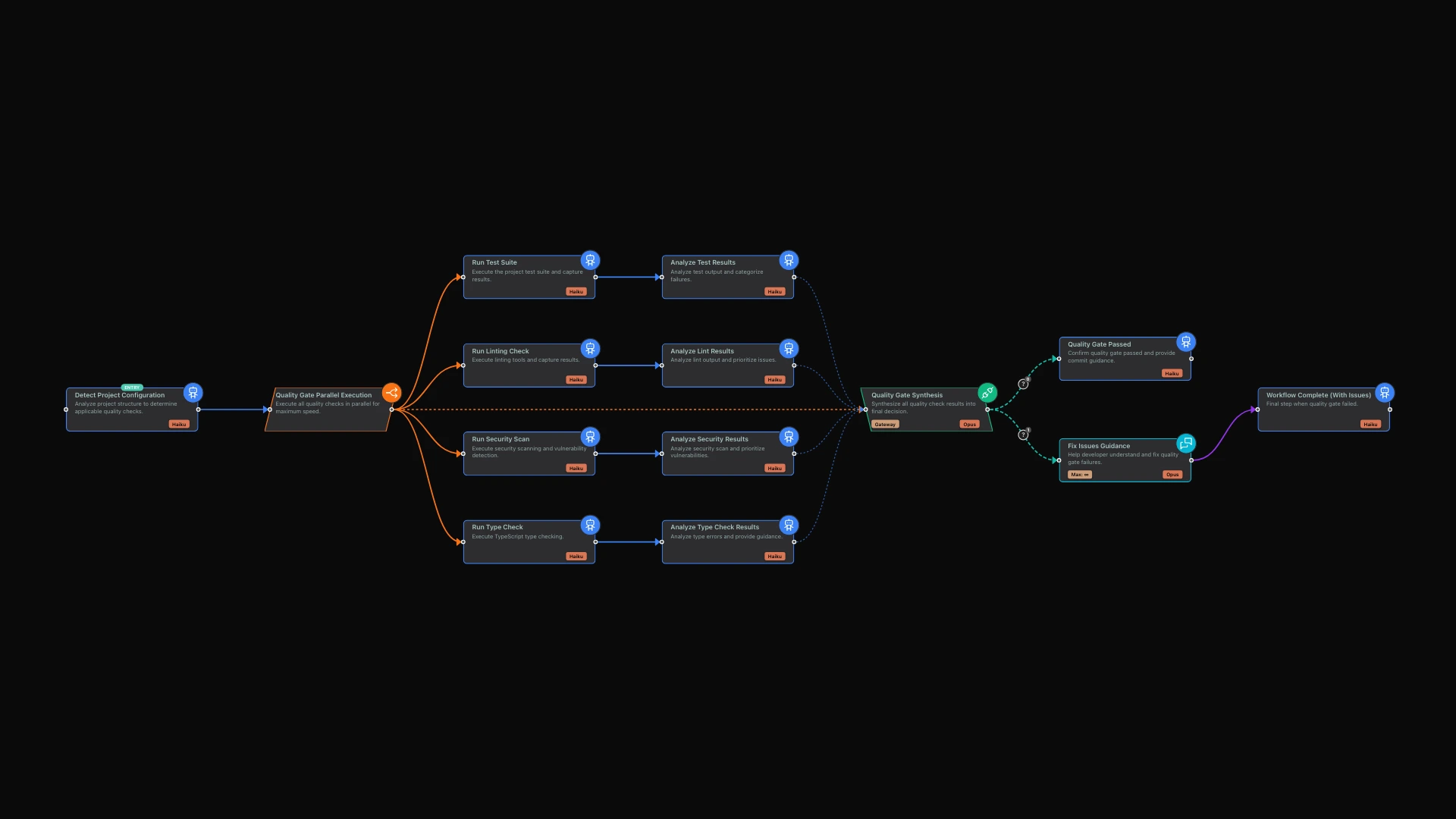
Using the limerIQ visual workflow editor, you can build comprehensive quality gates with four parallel validation streams:
- Test Suite Validation - Run and analyze test results
- Linting Check - Enforce code style and catch common errors
- Security Scan - Identify vulnerabilities and risky patterns
- Type Check - Verify type safety for TypeScript projects
How Quality Gates Work
The workflow unfolds in stages, each designed to maximize coverage while minimizing your time investment.
Understanding Your Project
First, the system analyzes your project structure to determine which quality checks apply. It looks for test files, linting configuration, TypeScript setup, and security scanning tools. This quick analysis uses the most cost-efficient AI model since it only needs to detect what is present.
Projects vary. A TypeScript project needs type checking. A JavaScript project does not. A project with comprehensive test suites needs test execution. A brand new project might not have tests yet. The workflow adapts to what you have, running the checks that are relevant and skipping those that are not.
Running Checks in Parallel
The heart of the workflow runs all applicable checks simultaneously. Tests execute while linting checks code style. Security scans analyze dependencies while type checking verifies type safety.
This parallel execution means total time equals the slowest check, not the sum of all checks. If your tests take two minutes, your linting takes thirty seconds, and your security scan takes a minute, you wait two minutes, not three and a half.
Each check runs independently in its own environment. They do not interfere with each other. They do not wait for each other. They just run.
Intelligent Analysis
Raw check output is not always actionable. A security scan might list fifty dependency vulnerabilities, but only three are actually relevant to your project. A test failure might indicate a flaky test, not a real bug.
After each check completes, an analysis step interprets the results. For tests, it determines how many passed versus failed, what specific failures occurred, and whether failures are critical or minor. For security scans, it categorizes vulnerabilities by severity: critical issues that must be fixed before shipping, high-severity issues that should be addressed soon, and lower-severity issues to track for future cleanup.
This separation of execution and analysis is powerful. The checks provide reliable, deterministic results. The AI provides intelligent interpretation that surfaces what actually matters.
Making the Decision
With all checks complete and analyzed, a synthesis step combines everything into a single pass/fail decision.
This step weighs multiple factors. Not every lint warning should block a release. Not every low-severity vulnerability is urgent. The synthesis considers the full picture and makes a judgment call.
You get a clear outcome: proceed to commit, or address blocking issues first. If there are issues, you see exactly what they are and get actionable guidance on how to fix them.
Guidance When Things Fail
When checks fail, the workflow does not just stop. It helps you understand what went wrong and how to fix it.
An interactive guidance step presents the blocking issues, explains why they are problems, and suggests the fastest path to resolution. If error messages are confusing, you can ask for clarification. If you are unsure how to fix something, the AI can walk you through it.
This turns quality gate failures from frustrating obstacles into learning opportunities.
Captured Results for Future Reference
The workflow saves results as artifacts for future reference. You get test results, security reports, and lint summaries stored in your project.
These artifacts serve multiple purposes. They create an audit trail so you know what was checked and when. They provide debugging context when issues arise later. They reveal trends in your quality metrics over time.
The Economics of Automated Quality
You might wonder whether automated quality gates are worth the overhead. Consider the alternatives.
Manual testing before each commit takes time and requires discipline you might not have at midnight. Skipping quality checks leads to bugs in production, which interrupt feature development and damage user trust. Hiring QA help is expensive and often overkill for solo projects.
Automated quality gates run consistently every time, catch issues before users do, and cost a fraction of manual alternatives. The AI tokens used during execution are minimal because the checks are focused and efficient.
The ROI becomes clear the first time your quality gate catches a breaking change before it reaches production.
Beyond Pre-Commit Checks
Once you have quality gates working, extend the pattern to other scenarios.
Pre-Push Checks: More thorough validation before pushing to your remote repository. Run the full test suite rather than just quick checks.
Pull Request Review: Automated quality gates on pull requests ensure every merge meets your quality standards, even when you are merging your own code.
Nightly Builds: Comprehensive checks that run overnight, catching issues that might not surface in quick pre-commit checks.
Release Validation: Full test suite execution before deployment, ensuring production gets only thoroughly validated code.
The same workflow structure scales from quick local checks to complete quality pipelines.
Customizing Your Quality Standards
The visual workflow editor makes it easy to adjust quality standards for your specific needs.
Maybe you want stricter type checking but are willing to tolerate some lint warnings. Maybe security vulnerabilities above medium severity should always block, but performance warnings can be addressed later. Maybe tests must pass completely, but documentation gaps can be noted without blocking.
Each check and its analysis step can be configured for your project's specific requirements. You define what quality means for your codebase.
The Discipline Advantage
Quality gates should not require discipline or willpower. They should be automatic, fast, and informative.
When checks run automatically, you cannot forget them. When they run in parallel, they do not slow you down significantly. When failures include guidance, they help you improve rather than just blocking you.
This is the discipline advantage of automation. You get consistent quality enforcement without relying on your own consistency.
Getting Started
Open the limerIQ visual workflow editor and explore the quality gates template. You will see how checks fan out in parallel and converge at the synthesis point.
Run the workflow against your current project. See what it catches. Observe how the synthesis step weighs different findings. Review the guidance when issues are detected.
Integrate the workflow with your version control process. Pre-commit hooks trigger quality gates automatically, ensuring every commit meets your standards without requiring you to remember.
Watch as your bug reports decrease, your security posture improves, and your code quality rises. All without adding hours to your workflow.
Conclusion
Quality gates should not require heroic discipline. They should be automatic, fast, and informative. With limerIQ, solo developers get the same rigorous validation that enterprise teams enjoy, without the overhead of maintaining complex infrastructure.
The workflow catches bugs before they ship, identifies security issues before they become vulnerabilities, and enforces code quality without slowing you down. Run it once, and you will wonder how you ever shipped without it.
Ship features. Let AI catch the bugs.
Resources:
Next in Series: "The Parallel Code Review: How limerIQ Eliminates Your Team's Review Bottleneck"