
Set It and Forget It: How Compliance Checks Enable Autonomous Development
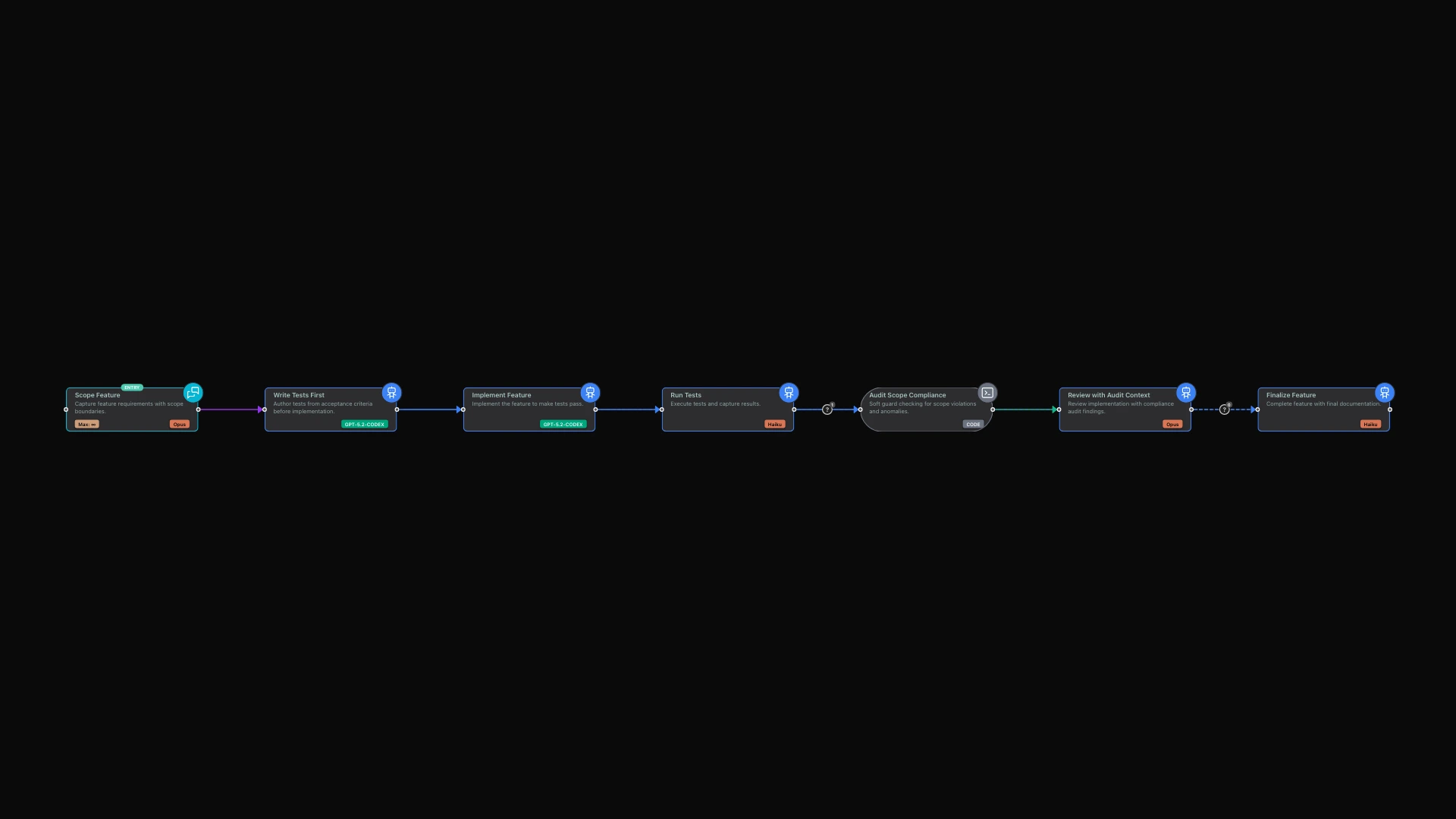
A comprehensive test-driven development workflow that enforces scope boundaries, validates compliance artifacts, and conducts soft-guard audits at every stage. Perfect for teams that need to balance r
The Promise of Autonomous AI Development
The dream of AI-assisted development is compelling: describe what you want, walk away, and return to working software. But reality often falls short. AI agents wander off task. They forget to create critical files. They claim tests pass when they do not. They require constant babysitting.
limerIQ solves this with compliance checks: automated mechanisms that verify AI fulfills its commitments before moving on. These features transform AI from an unpredictable assistant into a reliable autonomous developer.
The Problem: AI Without Accountability
Anyone who has worked with AI coding assistants knows the frustration. You ask the AI to implement a feature with tests. It produces the implementation, assures you the tests are written, and you move on -- only to discover later that the test file was never created. Or worse, the tests exist but they do not actually test anything meaningful.
This accountability gap becomes critical for workflows that run unattended. If you start a development workflow at 5 PM expecting to return to completed work the next morning, you need confidence that the AI will actually deliver what it promises. Without verification mechanisms, you are gambling.
The challenge is not that AI is unreliable in principle. The challenge is that AI operates probabilistically. It usually does what you ask. But "usually" is not good enough for production workflows, especially when you are not watching.
How limerIQ Builds in Accountability
limerIQ addresses this challenge through four interlocking compliance mechanisms that work together to ensure AI delivers on its commitments:
File Verification
The most fundamental check is verifying that expected files actually exist after a step completes. When you define a workflow step that should produce documentation, you can specify exactly which files must be created. If the step completes but those files are missing, the system detects the gap immediately.
This sounds simple, but it catches a surprisingly common failure mode. AI assistants frequently claim to have created files when they have not, or create files in the wrong location, or create placeholder files without real content. Automatic verification eliminates this entire category of problems.
Self-Healing Execution
When compliance checks detect missing deliverables, limerIQ does not simply fail. Instead, it automatically resumes the step with feedback about what was missing. The AI receives a clear message: "You said you would create these files, but they do not exist. Please complete this work."
This self-healing behavior is transformative for long-running workflows. Rather than failing at 2 AM because the AI forgot one file, the workflow automatically retries and usually succeeds on the second attempt. You can configure how many retry attempts are appropriate for each step -- perhaps one or two for simple tasks, three or four for complex ones.
Quality Gates
Beyond verifying file existence, limerIQ can perform deeper validation at any point in the workflow. These quality gates can verify that code compiles without errors, that tests pass, that documentation is complete, that security requirements are met, or that performance benchmarks are satisfied.
Unlike hard failures, quality gates enable nuanced responses. The workflow can proceed with warnings, route to different paths based on validation results, or escalate to human review rather than stopping entirely. This flexibility reflects the reality that not every issue should block progress -- some warrant a warning, others require immediate attention.
Scope Boundaries
AI agents have a tendency to expand their scope. Asked to fix a bug, they refactor half the codebase. Asked to write documentation, they start implementing features. This scope creep wastes time, introduces unnecessary risk, and often produces work that nobody asked for.
limerIQ can inject periodic reminders to keep AI focused on its assigned task. For interactive conversations that might drift over time, the system can reinforce boundaries: "You are the documentation step. Only document what exists. Do not implement new features."
The Power of Soft-Guard Audits
Production workflows often need nuanced compliance. Not every anomaly should block progress. limerIQ supports soft-guard audit patterns that collect warnings without automatically failing the workflow.
These audits can detect situations like:
- Files modified outside the expected scope
- Test files changed without test commands being run
- Dependency file modifications that might introduce security issues
- Discrepancies between what the AI reported and what actually happened
Rather than treating these anomalies as automatic blockers, the audit passes them to review steps as context. Human reviewers or AI reviewers can then decide whether the situation warrants blocking the work or merely noting for follow-up.
This pattern treats anomalies as information, not as automatic verdicts. The reviewer considers context before escalating, which produces much better outcomes than rigid rules that cannot account for legitimate exceptions.
What Autonomous Development Actually Looks Like
With these compliance mechanisms in place, here is how an autonomous development cycle works:
Discovery Phase: The AI analyzes your codebase and produces documentation about project architecture, testing patterns, and scope boundaries. Compliance checks verify these documents actually exist before the workflow proceeds to planning.
Implementation Phase: The AI implements the requested changes within defined scope boundaries. Periodic reminders keep it focused on the assigned work. Expected file checks verify that implementation artifacts exist.
Testing Phase: The AI runs tests and captures results. Compliance checks verify that test output files exist regardless of whether tests pass or fail. You always get visibility into what happened.
Review Phase: Soft-guard audits collect any anomalies -- files changed outside scope, unexpected patterns, potential issues. These anomalies inform the review but do not automatically block progress.
Integration Phase: With all checks passed, the work is ready for integration with confidence that all expected deliverables exist and have been validated.
Throughout this cycle, any compliance failure triggers automatic retry with feedback. The AI learns what it missed and gets another opportunity to complete the work correctly. Only after multiple retry attempts does the workflow pause for human intervention.
The Real-World Impact
Consider a typical scenario: you start a feature build workflow at 5 PM and leave for the day.
Without compliance checks: The workflow fails at step 3 because the AI forgot to create a test file. You arrive the next morning to a stopped workflow and wasted time. You have to diagnose what happened, restart partially completed work, and lose hours to investigation and recovery.
With compliance checks: The workflow detects the missing file, resumes the step with feedback, and the AI creates the test on the second attempt. You arrive to a completed feature with passing tests. The overnight hours were productive, not wasted.
The difference is not just convenience. It is the difference between AI as a tool requiring constant supervision and AI as an autonomous team member that can be trusted with overnight tasks.
Best Practices for Compliance-Driven Workflows
Be specific about expected deliverables: Vague expectations lead to partial compliance. Instead of hoping the AI will create appropriate documentation, specify exactly which documents must exist.
Match retry limits to complexity: Simple steps need fewer retries. Complex steps benefit from more opportunities to self-correct. A step that generates a single file might need one retry. A step that produces comprehensive documentation might need three or four.
Use soft guards for review context: Not every anomaly warrants blocking the workflow. Let reviewers decide what matters based on context rather than rigid rules.
Define scope boundaries early: Clear boundaries help both humans and AI understand what work is in scope and what is out of scope. This prevents scope creep and makes compliance checking more meaningful.
Capture artifacts even on failure: When tests fail, you still want the test output for debugging. Configure compliance checks to capture diagnostic information regardless of pass/fail status.
The Confidence to Walk Away
The ultimate benefit of compliance checks is confidence. Confidence that when you start a workflow and walk away, the AI will either complete the work correctly or pause at a meaningful point with clear information about what went wrong.
This confidence transforms how teams use AI development assistants. Instead of babysitting every interaction, developers can delegate substantial work and return to completed deliverables. Instead of hoping the AI did what it promised, they can verify that commitments were met.
Compliance checks transform AI development from supervised assistance to autonomous execution. By verifying expected deliverables, auto-resuming on failure, validating quality gates, and guarding against scope creep, limerIQ enables the "set it and forget it" experience that makes AI-assisted development truly productive.
Next Steps:
- Explore how compliance checks appear in the Visual Editor with real-time status indicators
- Learn about the Sprint Gateway Pattern for iterative development with compliance at each iteration
- Discover how Git Worktree Isolation enables parallel development with compliance checks on each branch
Related Articles: