
The Ralph Wiggum Loop: Persistent Iteration Until Success
Set a goal, define success, and let AI iterate until it gets there. Hands-off development that doesn't give up.
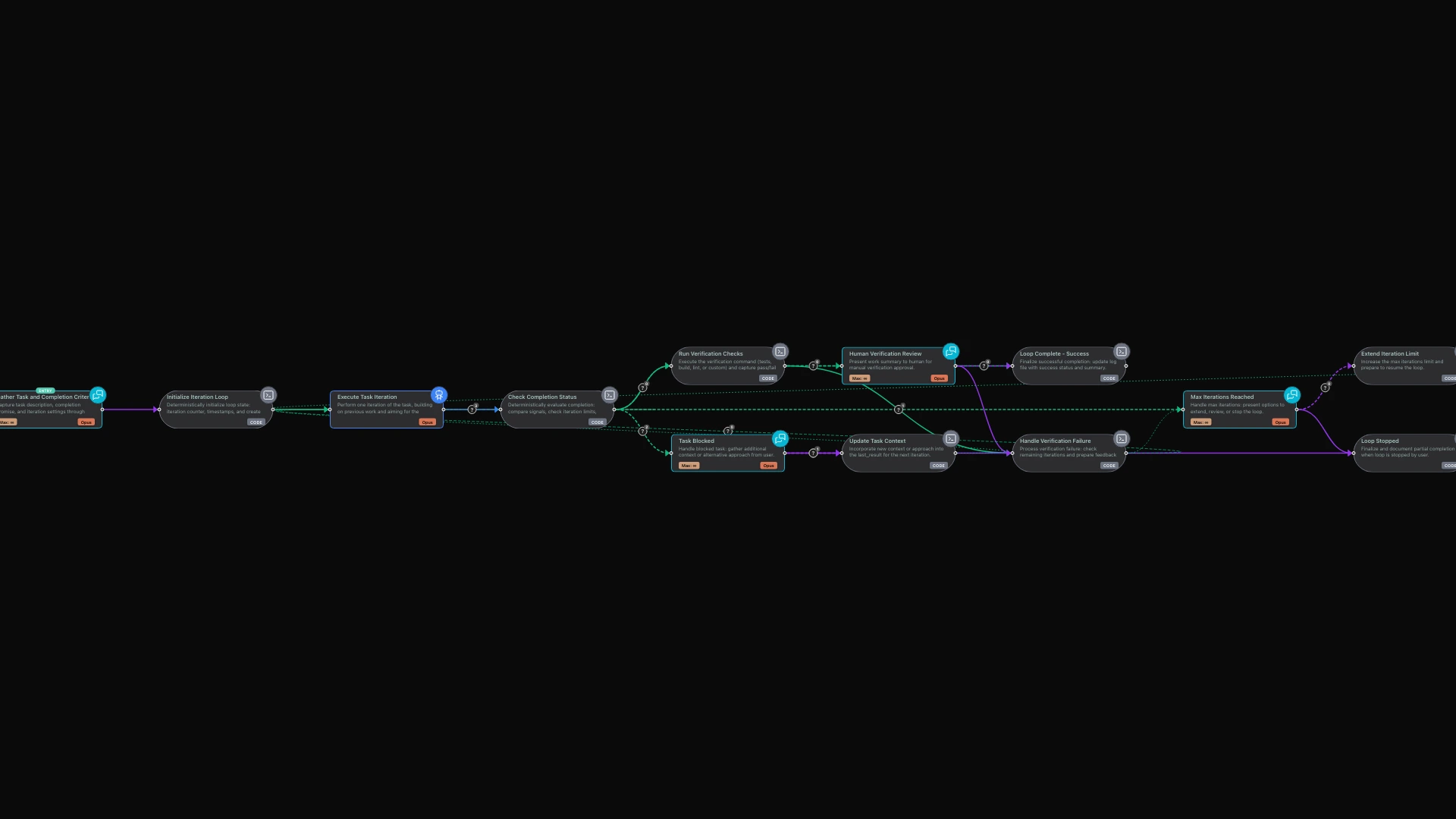
There's a development technique gaining traction in AI-assisted coding circles called the "Ralph Wiggum Loop." Named after the persistently optimistic Simpsons character, it embodies a simple but powerful philosophy: keep trying until you succeed.
The concept is straightforward. You define a task with clear completion criteria, then let an AI agent work on it repeatedly. Each iteration builds on the previous one. Files created in iteration three are visible in iteration four. Test failures in iteration seven inform the fixes in iteration eight. The AI keeps going until either the task is complete or you've hit a safety limit.
This isn't about getting it right the first time. It's about getting it right eventually through persistent, focused effort.
The Problem with One-Shot Development
Traditional AI-assisted coding often follows a one-shot pattern: you prompt, the AI responds, you evaluate, you prompt again with corrections. This works for simple tasks, but complex development rarely succeeds on the first attempt.
Consider building a REST API with full CRUD operations, input validation, comprehensive tests, and documentation. A single prompt might produce code that looks reasonable but fails half the tests. You provide feedback. The AI fixes those issues but breaks something else. You provide more feedback. The cycle continues, with you managing every iteration manually.
The Ralph Wiggum approach inverts this dynamic. Instead of you managing the iteration loop, the system manages it. You define what "done" looks like, and the AI keeps working until it gets there.
How the Iterative Loop Works
The limerIQ Ralph Wiggum workflow implements this pattern with visual clarity and intelligent safeguards.
Setting Up the Task
You begin by describing what you want to accomplish. This isn't just a prompt—it's a specification with success criteria. The workflow guides you through defining:
- What should be built or fixed
- How to verify it's working (tests passing, build succeeding, lint clean)
- What phrase signals completion ("ALL_TESTS_PASSING", "FEATURE_COMPLETE")
- How many iterations to allow before stopping
The quality of your task definition directly impacts success. Vague goals produce vague results. Specific, verifiable criteria lead to concrete outcomes.
The Iteration Cycle
Once configured, the workflow enters its core loop:
- Execute: The AI works on the task, reviewing what exists, making progress, running verification
- Check: Did the completion signal appear? Are we at the iteration limit?
- Decide: Continue iterating, signal success, or escalate to human
Each iteration sees everything from previous iterations. If iteration five created a file, iteration six can read and modify it. If iteration eight ran tests and saw failures, iteration nine knows exactly what failed and why.
This accumulated context is the key insight. The AI isn't starting fresh each time—it's building on its own previous work.
Verification and Safety
The workflow doesn't just trust that the AI says it's done. When the completion signal appears, verification runs automatically. If you specified "tests" as your verification method, the test suite executes. If tests fail, the workflow loops back for another iteration rather than declaring false victory.
Safety limits prevent infinite loops. If maximum iterations are reached without completion, the workflow pauses and presents options: extend the limit, review progress, or stop with partial results. You're never trapped in a runaway loop.
When Iterative Refinement Shines
The Ralph Wiggum pattern excels in specific scenarios:
Test-Driven Development
Define your acceptance tests first, then let the AI iterate until all tests pass. The tests provide objective verification—there's no ambiguity about whether the task is complete.
Greenfield Projects
Starting from scratch? Define the requirements, set a generous iteration limit, and let the workflow build incrementally. Each iteration adds functionality, fixes bugs discovered in testing, and refines the implementation.
Refactoring with Verification
Refactoring is risky because you might break existing functionality. Define success as "all existing tests pass plus the new structure is in place," and let the AI iterate through the transformation safely.
Bug Fixing with Reproduction
When you can reproduce a bug in a test, the Ralph Wiggum pattern is ideal. The test fails initially, the AI attempts fixes, the test either passes or provides feedback for the next attempt.
When to Use a Different Approach
Not every task benefits from iterative refinement:
Design Decisions: Tasks requiring human judgment about aesthetics, user experience, or business priorities shouldn't be left to autonomous iteration.
Unclear Success Criteria: If you can't define what "done" looks like objectively, the loop has no target to aim for.
One-Shot Operations: Simple, well-understood tasks don't need the overhead of an iteration loop.
Production Debugging: When investigating issues in production, you want targeted, careful analysis—not persistent iteration that might cause more problems.
Crafting Effective Task Definitions
Success with the Ralph Wiggum pattern depends heavily on how you define the task:
Be Specific About Completion
Instead of "build a todo API," specify:
- All CRUD endpoints working
- Input validation in place
- Tests passing with coverage above 80%
- README with API documentation
- Signal: FEATURE_COMPLETE
Break Large Tasks into Phases
Instead of "build an e-commerce platform," consider:
- Phase 1: User authentication (JWT, tests)
- Phase 2: Product catalog (list/search, tests)
- Phase 3: Shopping cart (add/remove, tests)
- Signal after each phase, or one final signal when all complete
Include Escape Hatches
Tell the AI what to do if stuck: "After 15 iterations without progress, document what's blocking and suggest alternative approaches." This prevents spinning on impossible tasks.
The Philosophy of Persistent Iteration
The Ralph Wiggum pattern embodies several principles worth internalizing:
Iteration Over Perfection: Don't expect perfect results on the first attempt. Let the loop refine the work progressively.
Failures Are Data: Each failed iteration provides information. Test failures show what's broken. Build errors reveal missing dependencies. These aren't setbacks—they're guidance for the next attempt.
Verification Is Non-Negotiable: The completion signal alone isn't enough. Automated verification confirms that success is real, not imagined.
Persistence Wins: Complex tasks require multiple attempts. The loop handles retry logic automatically, freeing you to focus on other work while iteration continues.
Real-World Results
The Ralph Wiggum technique has produced impressive results in practice. Development teams have reported:
- Complete repositories built overnight while engineers slept
- Complex features implemented at a fraction of traditional cost
- Reduction in manual iteration management from hours to minutes
The key is appropriate task selection and good completion criteria. Not every task fits the pattern, but those that do benefit enormously from autonomous iteration.
Getting Started
The limerIQ Ralph Wiggum workflow is ready to use. Open it in the visual editor to see the iteration loop structure—task intake flows to initialization, then enters the core cycle of execution, checking, and verification, with branches for completion, extension, and stopping.
Start with a small, well-defined task that has clear verification. A function that needs to pass specific tests. A script that needs to produce correct output. Build confidence with these contained experiments before tackling larger challenges.
As you gain experience, you'll develop intuition for what makes a good iterative task, how to set appropriate iteration limits, and when to intervene versus when to let the loop continue.
The Ralph Wiggum Loop isn't magic. It's systematic persistence applied to development. Define success clearly, let the AI iterate, verify the results. Repeat until done.
Related Articles:
- Set It and Forget It: Compliance Checks - Automated verification for autonomous development
- Debug Like a Pro - Session resume and model swapping for iteration
- The Checkpoint Pattern - Human control without micromanagement