The Best of Both Worlds: Mixing Code Steps with AI Steps
Use deterministic code for predictable operations. Use AI for reasoning. Get the best of both.
Sometimes you need precision. A calculation that returns the same result every time. A file operation that executes exactly as specified. A data transformation with no room for interpretation.
Other times you need judgment. Analysis of code quality. Synthesis of competing ideas. Natural language understanding and generation.
Traditional AI development forces a choice: either you write code that handles everything deterministically, or you hand everything to an AI and hope for consistency. Both approaches have obvious limitations.
limerIQ gives you a third option: mix code steps with AI steps in the same workflow. Use the right tool for each job.
The Problem with Pure Approaches
Pure Code Workflows
Traditional automation scripts are predictable but rigid. They do exactly what you tell them. Need to count files in a directory? Code returns the exact number, formatted exactly as specified, every single time.
Great for file operations, data transformations, and calculations. But what if you need to analyze those files for code quality? Detect architectural patterns? Generate documentation that actually reads well? Pure code cannot reason about nuance or context.
Pure AI Workflows
AI excels at reasoning, analysis, and generation. But AI outputs are inherently variable. Ask an AI to count files and you might get slightly different formats each time:
"There are 42 TypeScript files"
"42 .ts files found"
"I found forty-two TypeScript source files"
All technically correct. All difficult to parse programmatically. All problematic when downstream steps need exact values.
When you need precise values for downstream processing, pure AI becomes unreliable.
The Hybrid Approach
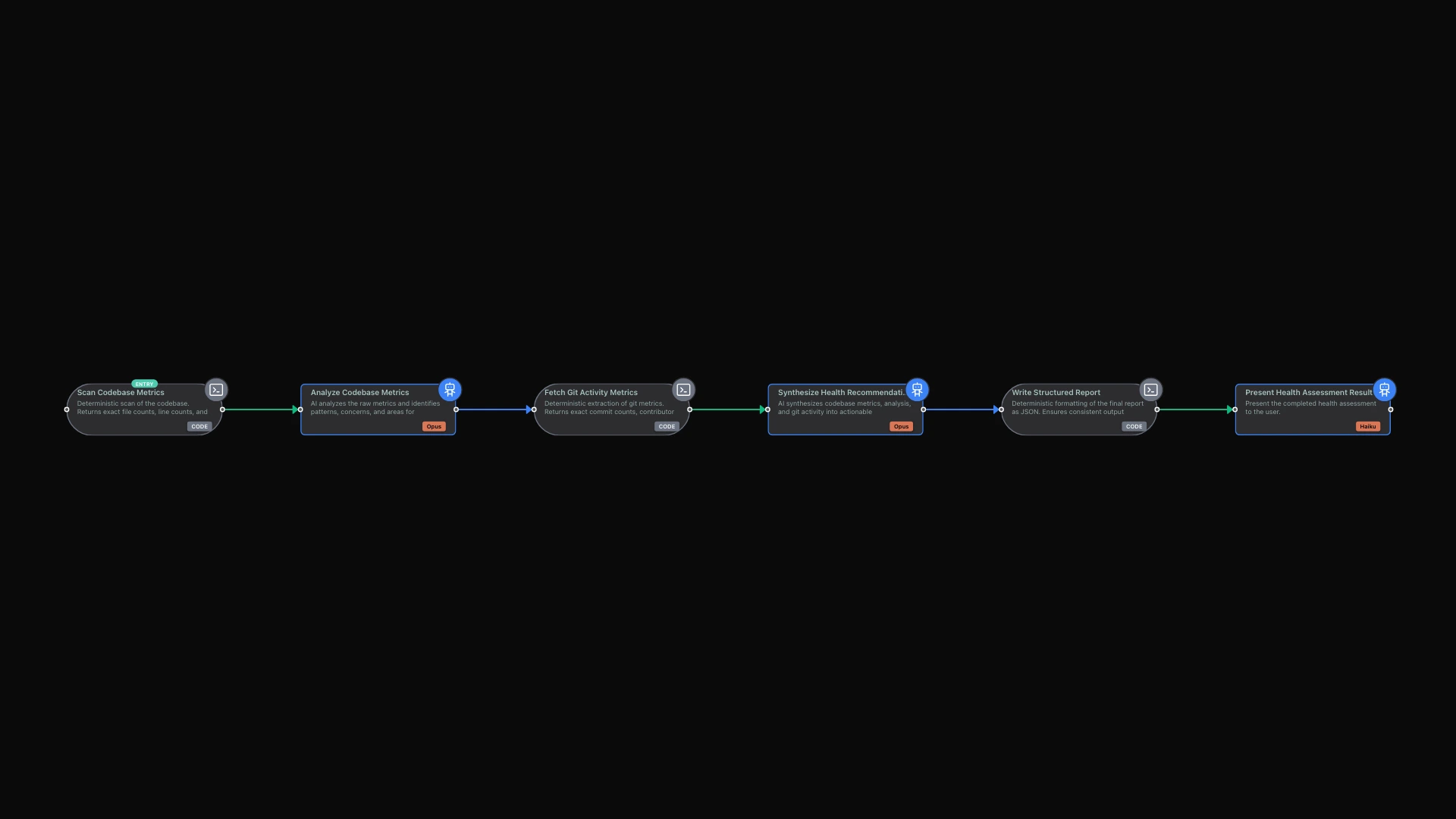
limerIQ solves this by letting you seamlessly combine deterministic code execution with AI reasoning in the same workflow. The visual editor makes this straightforward: code steps appear in green, AI steps appear in blue, and you connect them however your logic requires.
The data flows cleanly. A code step gathers precise metrics -- exact file counts, calculated complexity scores, measured coverage percentages. It produces typed outputs: numbers that are numbers, arrays that are arrays, booleans that are true or false.
The AI step that follows receives this clean, typed data. It does not need to parse natural language representations of numbers. It does not need to guess at formats. It receives the exact values and can focus entirely on reasoning about what those values mean.
What Code Steps Excel At
Code steps shine for operations that require predictability:
Data Transformation
- Parsing structured data formats
- Calculating statistics
- Filtering and sorting collections
- Generating structured outputs
File System Operations
- Reading files and directories
- Checking for existence
- Calculating file sizes
- Comparing file contents
External Integrations
- API calls with exact payloads
- Database queries
- HTTP requests
- Authentication flows
Mathematical Calculations
- Financial computations
- Statistical analysis
- Date and time operations
- Unit conversions
For all of these, you want the same input to produce the same output every time. Code delivers that guarantee.
What AI Steps Excel At
AI task steps shine for operations that require judgment:
Analysis and Assessment
- Code review and quality evaluation
- Architecture assessment
- Risk identification
- Pattern recognition
Content Generation
- Documentation writing
- Commit message creation
- Error message improvement
- User-facing copy
Synthesis and Summarization
- Combining multiple data sources
- Creating executive summaries
- Extracting key insights
- Prioritizing findings
Natural Language Understanding
- Interpreting user requirements
- Parsing unstructured input
- Understanding context
- Clarifying ambiguity
For all of these, you want thoughtful consideration of nuance and context. AI delivers that flexibility.
How Data Flows Between Steps
The power of hybrid workflows comes from seamless data flow. In the visual editor, you connect a code step to an AI step, and the outputs from code become inputs to AI automatically.
Consider a codebase health assessment:
First, a code step scans your project and collects metrics. It counts files, calculates lines of code, determines test coverage percentages, and lists dependencies. These are all exact values -- 847 files, 52,341 lines, 78.3% coverage, 23 dependencies. No ambiguity.
Next, an AI step receives these metrics and analyzes them. Is the codebase well-organized? Is test coverage adequate for a project of this type? Are there concerning dependency patterns? The AI reasons about what the numbers mean in context.
The AI produces qualitative assessments. "Coverage is good for a backend service but should be higher for payment-related code." "The dependency count is reasonable, but three dependencies are outdated security risks." These insights require judgment that code cannot provide.
Finally, a code step formats the final report. It takes the AI's analysis and produces a structured output -- perhaps JSON for integration with other systems, or a formatted document for human review. The format is exact and predictable.
Each step uses the appropriate tool. Code handles the deterministic parts. AI handles the reasoning parts. The result is both reliable and intelligent.
A Decision Framework
When deciding whether to use code or AI for a particular step, ask yourself: "Would different humans give the same answer?"
If ten people would all give essentially the same answer -- like counting files or calculating percentages -- use code. The operation is deterministic, and code is faster, cheaper, and more reliable.
If ten people might give different but valid answers -- like assessing code quality or writing documentation -- use AI. The operation requires judgment, and AI can provide thoughtful consideration that code cannot.
When in doubt, lean toward code for data gathering and AI for data interpretation. Code collects facts. AI derives meaning from facts.
The Compound Advantage
When you combine deterministic code with intelligent AI, you get compound advantages:
- Reliability: Calculations never drift or vary
- Reasoning: Analysis never becomes mechanical or shallow
- Speed: Code steps execute instantly
- Quality: AI steps add human-like judgment
- Testability: Code outputs are predictable and verifiable
- Flexibility: AI handles edge cases gracefully
This is not AI replacing code or code replacing AI. This is orchestration using each tool where it excels. The whole becomes greater than the sum of its parts.
Practical Patterns
The Analysis Pipeline
A common pattern: code gathers data, AI analyzes it, code formats results.
First, code parses git history and extracts changed files. Then code runs static analysis tools and collects their outputs. Then AI reviews the changes and tools outputs to identify concerns. Finally, code formats the analysis into a structured report.
Each step uses the right tool. File parsing? Code. Static analysis invocation? Code. Judgment about what matters? AI. Report formatting? Code.
The Conditional Branch
Another common pattern: code determines routing, AI handles complex paths.
Code checks test coverage. If coverage exceeds 80%, the workflow proceeds directly to deployment preparation. If coverage falls below 80%, AI analyzes which areas need more testing and produces recommendations.
The routing decision is deterministic -- a number compared to a threshold. But the analysis of what to do about low coverage requires judgment.
The Validation Loop
A third pattern: AI proposes, code validates, AI adjusts.
AI generates code changes. Code compiles the changes and runs tests. If tests pass, the workflow proceeds. If tests fail, AI receives the failure messages and adjusts its approach.
The validation is deterministic -- either tests pass or they do not. But understanding why tests failed and how to fix them requires AI reasoning.
Getting Started
The visual workflow editor makes hybrid workflows intuitive to create. Code steps appear distinctly from AI steps, so you always know what type of processing each step performs.
When designing a new workflow:
- Identify operations that need exact outputs -- those become code steps
- Identify operations that need judgment -- those become AI steps
- Connect them so data flows from code to AI and back as your logic requires
- Verify that code outputs match what AI steps expect as inputs
The workflow validates that your connections make sense. AI steps receive clean, typed data they can trust. Code steps receive structured outputs they can process reliably.
No more parsing AI responses for numbers. No more hoping for consistent formats. No more choosing between reliability and intelligence.
You get both.