
The Checkpoint Pattern: Human-in-the-Loop Control Without Micromanagement
Using interactive checkpoints to maintain strategic control while delegating tactical execution
You hired smart people so you would not have to do everything yourself. So why does delegating to AI feel like either handing over the keys completely or watching every move?
The checkpoint pattern solves this tension. It gives you strategic control at critical decision points while letting AI handle the tactical work in between. You stay in control without becoming a bottleneck.
The Delegation Dilemma
Product managers and founders face a fundamental tension with AI automation:
Too much oversight: You review every step, approve every action, and basically do the work yourself with an AI assistant looking over your shoulder. You save no time and add coordination overhead.
Too little oversight: You kick off an automated workflow and hope for the best. Hours later, you discover it went in a direction you never intended. Now you are fixing mistakes instead of building products.
Neither extreme works. What you need is strategic intervention at the moments that matter.
Checkpoints: Your Strategic Control Points
A checkpoint is a pause in your workflow where execution stops for human input. The AI presents its work, you make a decision, and the workflow continues based on your direction.
The key insight: not every decision requires your input. Some are tactical (how to structure a function, which component library to use), and the AI handles those fine. Others are strategic (should we build feature A or feature B first? Is this scope appropriate for our timeline?), and those need your judgment.
Checkpoints let you separate the two.
What Makes an Effective Checkpoint
In limerIQ's visual workflow editor, checkpoints appear as interactive stages where the workflow pauses for your input. An effective checkpoint has three key elements:
1. Clear Context Presentation
When you arrive at a checkpoint, you immediately understand why the workflow paused and what decision is needed. The AI presents its work clearly:
"I have completed the analysis phase. Here is what I found:
- 12 user stories identified
- 3 external dependencies
- Estimated 2-week timeline
Would you like to proceed with full scope or reduce to MVP?"
2. Explicit Decision Options
Checkpoints offer clear choices rather than open-ended questions. Instead of "What do you think?" you see "Proceed, adjust, or stop?" This clarity accelerates decision-making and ensures the workflow knows how to respond to your input.
3. Meaningful Branching
Different decisions lead to different next steps. If you choose to reduce to MVP, the workflow takes a different path than if you proceed with full scope. The power of checkpoints comes from the workflow adapting to your input rather than following a fixed path.
Where to Place Checkpoints
Not every step needs a checkpoint. Place them at natural decision boundaries:
| Checkpoint Type | When to Use | Example |
|---|---|---|
| Scope Gate | Before committing resources | "Should we build the full feature or MVP first?" |
| Quality Gate | After analysis, before action | "These are the issues found. Which are blockers?" |
| Direction Gate | At branch points | "Two approaches are viable. Which aligns with strategy?" |
| Approval Gate | Before irreversible actions | "Ready to merge to main and deploy?" |
The art is in choosing where checkpoints add value versus where they add friction.
The Feature Development Pipeline
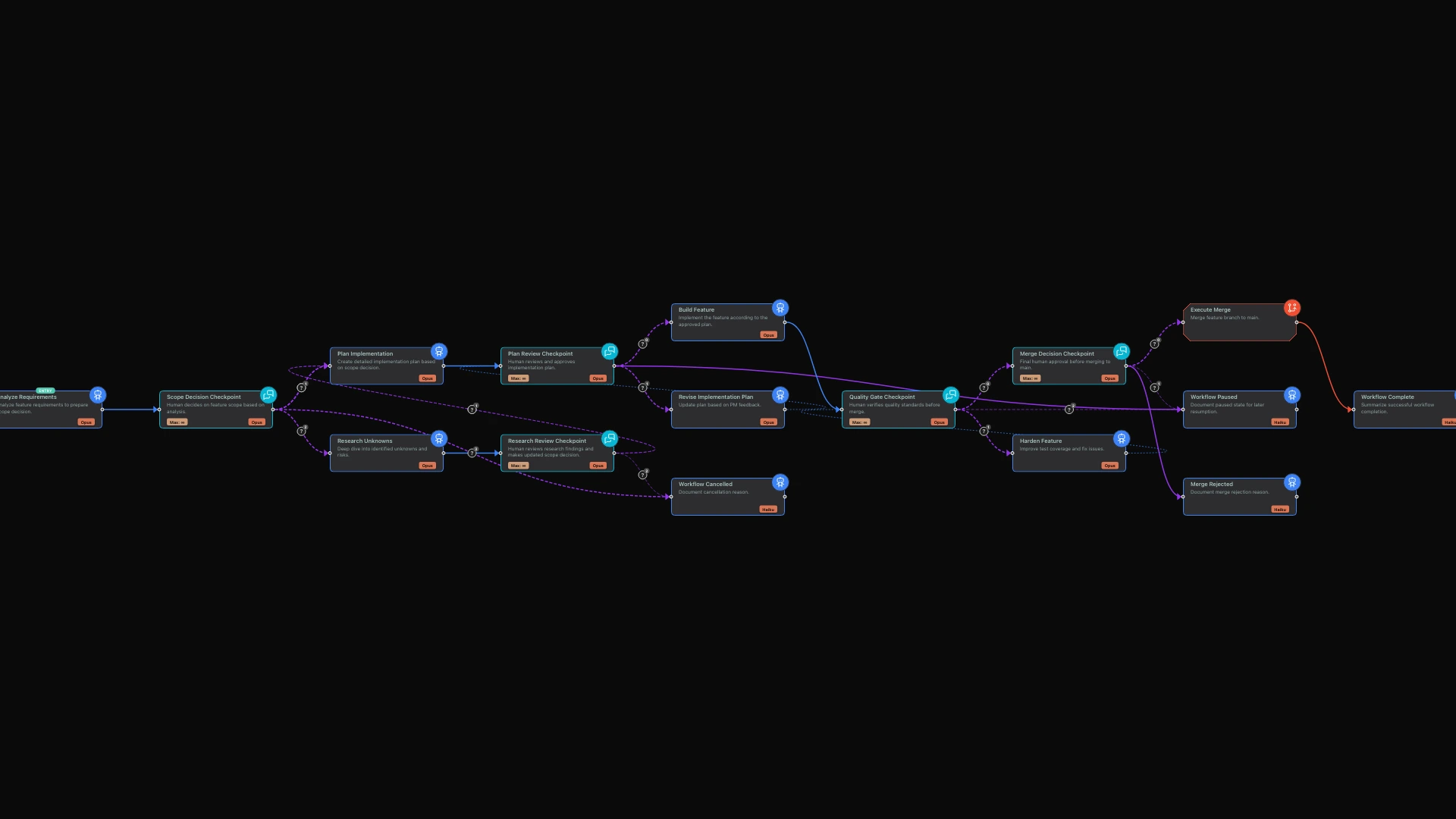
Consider a typical feature development workflow with strategic checkpoints:
Phase 1: Requirements Analysis (Automated)
The workflow analyzes requirements, identifies dependencies, and estimates complexity. This is tactical work - let the AI handle it.
Phase 2: Scope Checkpoint (Human Decision)
You see the analysis and decide: full scope, reduced MVP, or pause for more research. The AI cannot make this call - it requires business context only you have.
"Based on my analysis, the full feature would take approximately 2 weeks and has 3 external dependencies. The MVP version could be completed in 3 days with no dependencies. Which approach aligns better with your current priorities?"
Phase 3: Implementation Planning (Automated)
Based on your scope decision, the workflow plans implementation steps, creates tasks, and allocates resources. More tactical work.
Phase 4: Plan Review Checkpoint (Human Decision)
You review the plan before any building begins. This is your last chance to catch misalignments before resources are committed.
"Here is the implementation plan: 8 tasks over 3 days, starting with the user interface and ending with integration testing. Any concerns before we begin building?"
Phase 5: Build (Automated)
The approved plan executes. Code is written, tests are created, documentation is updated. The AI has clear direction and executes autonomously.
Phase 6: Quality Checkpoint (Human Decision)
Before merging, you verify quality meets standards. The AI ran the tests; you decide if the results are acceptable.
"All 24 tests are passing with 87% code coverage. There is one warning about performance on large datasets. Is this acceptable for the current release, or should we address the performance concern first?"
Phase 7: Merge Decision Checkpoint (Human Decision)
The last gate before irreversible action. Once merged, the feature is in production. This decision stays with you.
"Everything is ready for deployment. Merge to main and deploy, or hold for additional review?"
Control Without Bottleneck
The checkpoint pattern keeps you in control without making you a bottleneck:
You control:
- Scope decisions
- Resource allocation
- Quality standards
- Deployment timing
AI handles:
- Analysis and research
- Implementation details
- Test execution
- Documentation generation
The workflow runs autonomously between checkpoints. You only engage when your judgment is needed.
The Visual Workflow Experience
In limerIQ's visual editor, checkpoints are immediately recognizable. They appear as interactive stages with a distinctive indicator showing where human input is required.
When you run a workflow and it reaches a checkpoint:
- Progress pauses visibly - The visual indicator shows exactly where in the pipeline you are
- Context appears clearly - You see what the AI has accomplished and what decision is needed
- Options are explicit - Clear choices let you respond quickly
- The workflow continues - Based on your decision, the appropriate next stage activates
For teams, this visibility is valuable. Anyone can look at a workflow in progress and understand where it stands. "Waiting at quality checkpoint" communicates more than "still working on it."
Real-World Impact
Organizations using the checkpoint pattern report:
- 70% less time in status meetings: Checkpoints capture decisions in context, reducing the need for synchronous updates
- Faster iteration: Automated work between checkpoints means features move faster when humans are not the bottleneck
- Better decisions: Seeing analysis results at decision time (not hours later in a meeting) improves decision quality
- Clear audit trail: Every checkpoint captures who decided what and why, creating natural documentation
Anti-Patterns to Avoid
Too Many Checkpoints
If every step requires approval, you have recreated micromanagement. Checkpoints should be at strategic boundaries, not tactical details.
Problematic: Checkpoint after every file is created
Better: Checkpoint after the entire feature is built
Unclear Decision Points
Checkpoints should present clear options, not open-ended questions. "What do you think?" is not a checkpoint - "Proceed, adjust, or stop?" is.
Problematic: "Here is the analysis. Let me know your thoughts."
Better: "Based on this analysis, should we proceed with full scope (2 weeks) or MVP (3 days)?"
Missing Meaningful Branches
A checkpoint without different paths based on your decision is just a pause. The power comes from the workflow adapting to your input.
Problematic: Every decision leads to the same next step
Better: Different decisions branch to different workflow paths
The Right Rhythm
Finding the right checkpoint rhythm takes some experimentation. Too few checkpoints and you lose control. Too many and you become the bottleneck.
A good starting point for feature development workflows:
- Scope checkpoint - Before significant work begins
- Plan review - Before implementation starts
- Quality gate - Before merging or deploying
- Release approval - Before going to production
Four checkpoints for a typical feature. Strategic, not overwhelming.
Strategic Control, Tactical Freedom
The best leaders set direction and let their teams execute. The checkpoint pattern brings this leadership style to AI orchestration:
- Set direction at checkpoints
- Let AI execute between them
- Verify results at quality gates
- Approve outcomes before irreversible actions
You stay in control. The AI handles the work. Nothing proceeds without your approval at the moments that matter.
That is human-in-the-loop done right.
Related articles: