
True Parallel Development: Git Worktree Isolation
Demonstrates limerIQ's unique git worktree isolation capability for true parallel feature development. Three independent features develop simultaneously in isolated workspaces with zero merge conflict
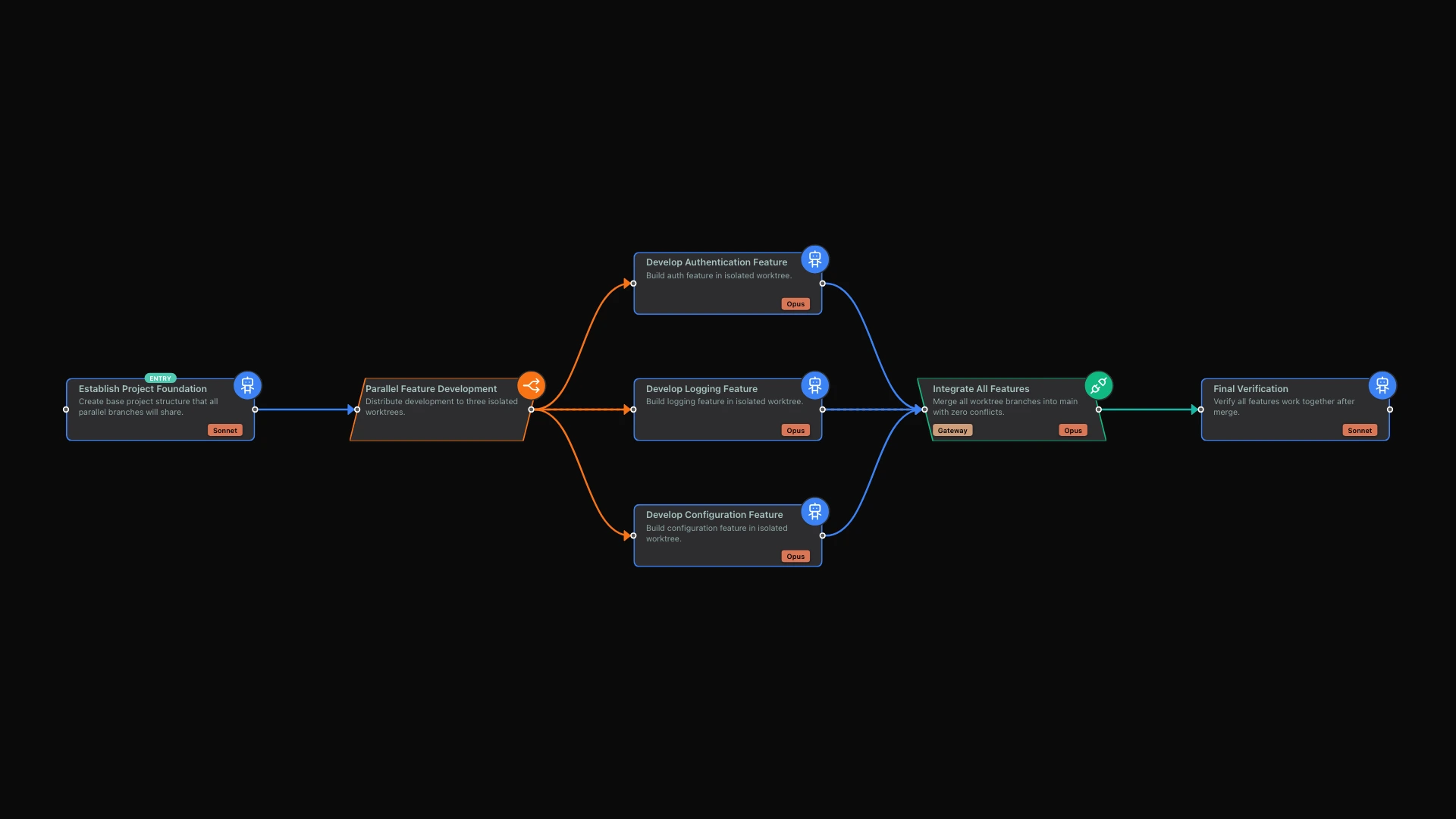
Merge conflicts are the hidden tax on parallel development. Every engineering team has experienced the scenario: three developers work on three features simultaneously, and when they come together to integrate, hours disappear into resolving conflicts. Traditional git workflows force developers to constantly pull, merge, and reconcile changes from teammates, creating friction that compounds with team size.
limerIQ eliminates this friction through automatic workspace isolation. When a workflow distributes work to multiple branches, each branch operates in its own isolated environment. The result: true parallel development with zero merge conflicts.
The Problem: Shared State Destroys Parallelism
Consider a typical feature development scenario. Your team needs to build three features simultaneously:
- Authentication system
- Logging infrastructure
- Configuration management
In traditional development, all three developers work in the same codebase. Developer A commits authentication changes. Developer B needs to pull those changes before committing logging changes. Developer C needs to pull both before working on configuration. This sequential dependency chain eliminates the parallelism you thought you had.
Worse, when developers skip the pull-before-commit ritual, conflicts accumulate. The integration phase becomes a reconciliation nightmare where understanding what changed requires archaeology through multiple conflicting commits.
The core issue: shared mutable state forces serialization of inherently parallel work. Even with git branches, the working directory is shared, and changes can step on each other.
The Solution: Isolated Workspaces
limerIQ solves this problem by giving each parallel branch its own completely isolated workspace. When you design a workflow in the visual editor with parallel branches, each branch gets a separate copy of the entire codebase to work in.
This isolation means:
- No visibility conflicts: Branch A cannot see uncommitted changes from Branch B
- Independent commits: Each branch commits to its own history without pulling
- Clean baselines: All branches start from the exact same foundation
- Atomic integration: Merges happen once, at the end, with full context
When three AI agents develop three features simultaneously, they literally work in three separate directories. The authentication feature develops in one location, the logging feature in another, the configuration feature in a third. They cannot interfere with each other because they do not share any mutable state.
The Sandwich Model: Foundation, Parallel Work, Integration
Effective workspace isolation follows what we call the "Sandwich Model":
First, establish a foundation. Before parallel work begins, a foundation step creates the shared structure that all branches will build on. This might include project scaffolding, shared interfaces, or common utilities. The foundation gets committed before any parallel work starts, ensuring all branches begin with identical baseline state.
Second, distribute to isolated branches. The workflow splits into parallel paths, each getting its own isolated workspace. Three features become three separate development environments, working simultaneously without awareness of each other.
Third, integrate at the end. Once all branches complete, an integration step merges everything together. The AI performing integration has full context about what each branch produced and can resolve any edge-case conflicts intelligently.
The critical insight: the foundation must be committed before parallel execution begins. If parallel branches need shared interfaces or project structure, that structure must exist in the committed codebase, not just in someone's working directory. Without a committed foundation, parallel branches would each create their own potentially conflicting base structure.
Why This Produces Zero Conflicts
The absence of merge conflicts is not accidental. It emerges from the architecture:
Isolated filesystems: Each branch has its own working directory. When the authentication branch creates auth-related files, those files do not exist in the logging or configuration workspaces. No file is ever modified simultaneously by multiple branches.
New file creation: Well-designed parallel work involves creating new files, not modifying existing ones. The authentication feature creates files in one area, the logging feature creates files in another, the configuration feature creates files in a third. These paths never overlap.
Stable foundation: All branches build on the same committed foundation. The shared interfaces exist identically in all workspaces because they were committed before parallel execution began. No branch modifies these shared files.
Single integration point: Merging happens once, at the integration step, with full context about what each branch produced. The AI performing integration can resolve any edge-case conflicts intelligently rather than mechanically.
Designing Workflows for Parallel Success
To maximize the benefits of workspace isolation, follow these design principles:
Commit the foundation before splitting. Any shared structure, interfaces, or utilities that parallel branches depend on must be committed before the parallel phase begins. The visual editor makes this clear: the foundation step must complete and commit before the parallel gateway distributes work.
Design branches to create, not modify. Each parallel branch should create new files in its own area rather than modifying shared files. Authentication creates auth files. Logging creates logging files. Configuration creates configuration files. This natural separation prevents conflicts.
Define interfaces upfront. If branches need to interact with shared code, define those interfaces in the foundation. Parallel branches implement the interfaces rather than defining their own conflicting versions.
Merge code changes at integration. When parallel branches produce code that should be combined, the integration step handles the merge. It has full context about what each branch produced and can make intelligent decisions about how to combine them.
A Practical Example: Multi-Feature Development
Consider building an e-commerce platform with three features: user authentication, product catalog, and shopping cart. In the visual editor, this workflow looks like:
Foundation Step: Creates the project structure with shared types, a feature registry, and directory scaffolding. Commits everything so all branches start with identical baseline.
Parallel Gateway: Distributes work to three isolated workspaces for authentication, catalog, and cart features.
Authentication Branch: Implements user registration, login, session management, and authentication tests. Works entirely within the auth feature directory. Commits independently.
Catalog Branch: Implements product listing, search, filtering, and catalog tests. Works entirely within the catalog feature directory. Commits independently.
Cart Branch: Implements add-to-cart, quantity management, checkout flow, and cart tests. Works entirely within the cart feature directory. Commits independently.
Integration Step: Merges all three branches. Updates the main entry point to register all features. Runs full test suite to verify integration.
Verification Step: Confirms everything works together. Produces a summary report.
Each branch works completely independently during the parallel phase. The authentication developer does not need to know what the catalog developer is doing. When integration happens, the AI merges the three independent feature sets into a coherent whole.
Beyond Feature Development
Workspace isolation enables patterns beyond feature development:
Parallel testing: Run unit tests, integration tests, and performance tests in separate workspaces simultaneously. Each test suite operates on the same codebase snapshot without interference from other test runs.
Competitive implementation: Have multiple AI agents implement the same feature differently, each in its own workspace. Compare the results and select the best implementation.
Research branches: Conduct parallel investigations into different technical approaches. Each investigation explores freely without affecting the others. Synthesize findings at the end without merging code.
Migration pipelines: Migrate different subsystems in parallel, each in its own isolated workspace. Integrate the complete migration when all subsystems are ready.
The Time Savings Compound
Traditional parallel development involves constant synchronization overhead: pulling changes, resolving mini-conflicts, communicating about who is working where. This overhead grows with team size and parallel work volume.
With workspace isolation, you perform exactly one integration at the end, with full context about what each branch produced. The time savings compound with the degree of parallelism:
| Parallel Branches | Traditional Git | limerIQ Isolated Workspaces |
|---|---|---|
| 2 branches | Many small merges | 1 integration |
| 3 branches | Many more merges | 1 integration |
| 5 branches | Exponentially more | 1 integration |
The difference becomes dramatic as parallelism increases. Three features developed with traditional git might involve dozens of mini-merges throughout development. With workspace isolation, you perform exactly one integration at the end.
Conclusion
Merge conflicts are not inevitable. They emerge from shared mutable state during parallel development. Isolated workspaces eliminate this shared state, enabling true parallelism where multiple AI agents develop simultaneously without stepping on each other.
The pattern is straightforward: establish a committed foundation, distribute work to isolated workspaces, develop independently, and integrate once at the end. The result is clean, conflict-free parallel development at any scale.
The next time you face a multi-feature development sprint, let the workflow handle the isolation. Your branches will stay clean, your merges will stay simple, and your development will stay truly parallel.
Related Articles:
- See Your Workflow Think: The Visual Editor - Visualize parallel branches in the workflow editor
- Two Models Are Better Than One: Competitive Execution - Use parallel execution for competitive analysis
- Set It and Forget It: Compliance Checks - Verify each branch produces expected deliverables