
The Platform Engineering Toolkit: Building Internal Developer Workflows
Create custom workflows that encode your organization's deployment patterns and best practices. Platform engineering for developer enablement.
Platform engineering is fundamentally about enablement. You build the roads so developers can drive fast without crashing. The challenge is that every organization has different roads: unique deployment processes, specific compliance requirements, proprietary tooling, and hard-won best practices that exist only in the heads of senior engineers.
What if you could capture all of that institutional knowledge in reusable, executable workflows? Not brittle scripts that break when someone changes a variable, but intelligent workflows that understand context, handle edge cases, and guide developers through complex processes.
That is what limerIQ enables for platform teams.
The Platform Engineering Challenge
Platform engineers face a unique set of problems:
-
Knowledge Silos: Deployment processes exist as tribal knowledge. When the expert is on vacation, deployments stall.
-
Inconsistency: Every team deploys slightly differently, leading to environment drift and debugging nightmares.
-
Support Burden: Platform teams spend more time answering "how do I deploy X?" than building new capabilities.
-
Documentation Decay: Written procedures become outdated the moment someone improves the process.
The traditional solution is to write extensive documentation and hope developers read it. The modern solution is to encode that documentation into executable workflows that guide developers through the process correctly every time.
The Self-Service Deployment Workflow
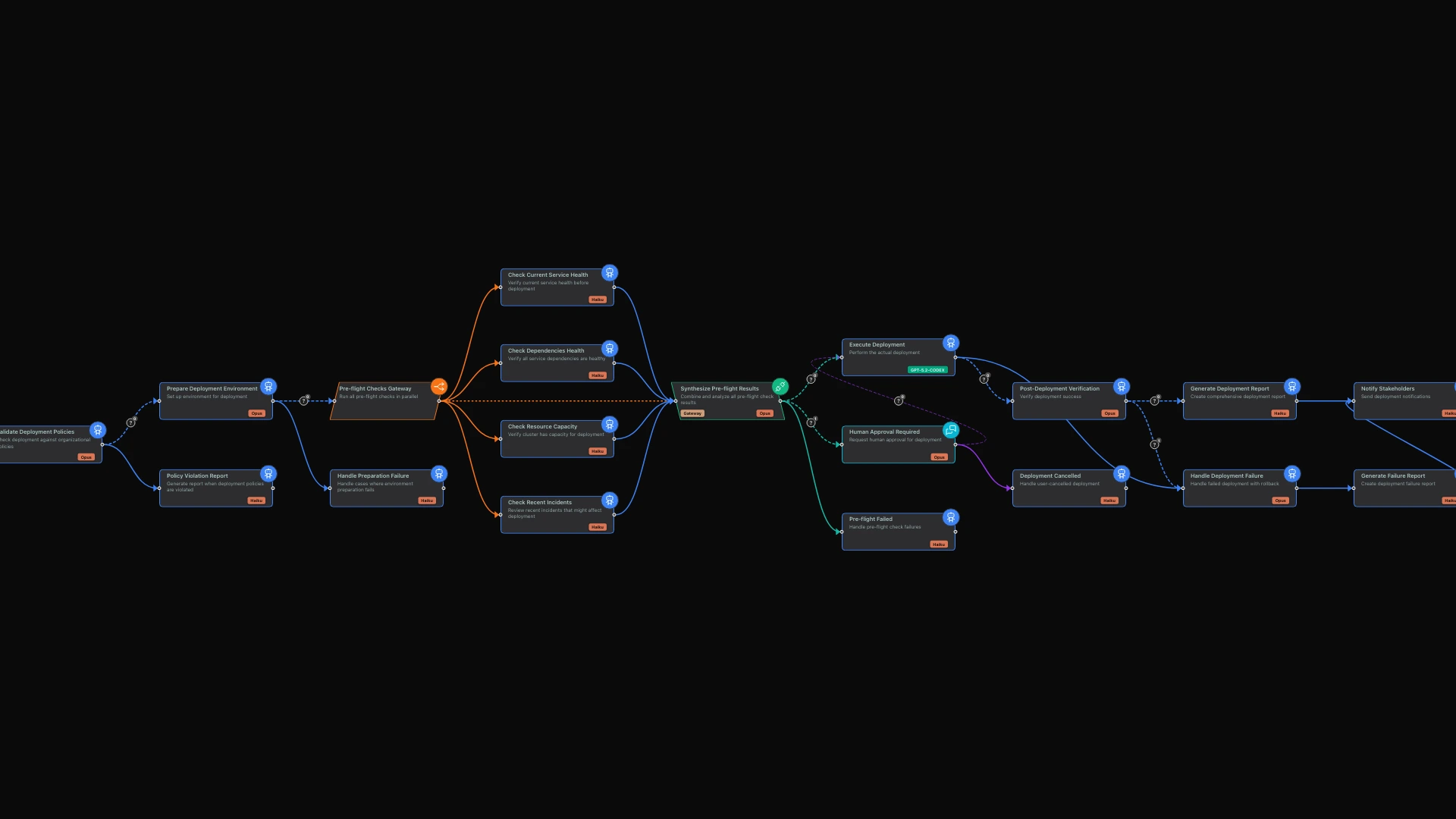
The showcase workflow demonstrates a complete deployment template that platform teams can provide to their developers. The flow moves through several key phases:
Gather Intent captures what the developer wants to deploy. Validate Policies ensures the request complies with organizational requirements. Pre-flight Checks verify the deployment can proceed safely. Deploy executes the actual deployment. Report documents what happened, or Rollback reverses the change if something goes wrong.
Let me walk through each component.
Capturing Deployment Intent
The workflow begins with an interactive conversation that captures what the developer wants to deploy.
The system asks about the service being deployed. Which service? What version? It asks about the target environment: development, staging, or production. It explores the deployment type: a full deployment, a canary release, or a blue-green switch.
For production deployments, the conversation goes deeper. Has this been tested in staging? Is there an approved change request? The AI asks the questions that a senior engineer would ask, ensuring nothing gets overlooked.
This interactive approach replaces static deployment forms with a conversational interface. The AI asks clarifying questions and catches common mistakes before they become production incidents.
Policy Validation
Platform teams have rules. Production deployments require approval. Certain services need security review. Database changes require rollback plans.
The workflow encodes these policies and validates every deployment request against them. Production deployments without an approved change request get flagged. Database migrations without rollback scripts are blocked. Deployments without health check endpoints are questioned.
This validation happens automatically, applying the same standards to every deployment regardless of who initiates it.
Parallel Pre-flight Checks
Before any deployment proceeds, the workflow runs multiple validation checks simultaneously.
It checks service health: are the services this deployment depends on running correctly? It checks dependencies: are all required resources available? It checks capacity: is there enough headroom for this deployment? It checks recent incidents: have there been any issues that might affect this deployment?
All of these checks run in parallel, completing quickly even though multiple validations are happening. The results are synthesized into a go/no-go recommendation.
This pattern ensures every deployment goes through the same validation, regardless of urgency or who initiates it. The pre-flight checks that a cautious senior engineer would run become standard practice for everyone.
Human Approval Checkpoint
When pre-flight checks raise warnings, the workflow pauses for human approval.
The system presents what was found: maybe there was a recent incident in a related service, or capacity is lower than usual. The human reviewer sees the context and decides whether to proceed.
This human-in-the-loop pattern gives platform teams control over risky deployments while still automating the happy path. Routine deployments proceed automatically. Edge cases get human oversight.
Deployment Execution
With validation complete and approval obtained, the deployment proceeds.
The workflow orchestrates the actual deployment using your organization's tools and patterns. It monitors progress, verifies health checks pass, and confirms the deployment completed successfully.
If something goes wrong, the workflow can trigger rollback procedures automatically, returning the system to its previous state.
Reporting and Documentation
Every deployment produces a comprehensive report: what was deployed, when, by whom, what checks passed, and what the outcome was.
This documentation happens automatically as a byproduct of using the workflow. You build an audit trail without requiring developers to fill out forms or write reports.
Encoding Institutional Knowledge
The real power of platform workflows comes from encoding your organization's specific knowledge.
Custom Personas
You can define personas that embody your organization's culture and practices. A platform engineer persona might know about your specific technology stack, your policies, and your internal resources.
When the workflow uses this persona, it references your internal wiki for detailed procedures, directs developers to your support channels for complex issues, and applies your specific deployment policies.
This institutional knowledge, which would otherwise live only in documentation nobody reads, becomes active guidance during the deployment process.
Organization-Specific Policies
Your compliance requirements, security policies, and operational standards can be built directly into workflow validation. Database migrations require rollback plans. High-traffic services require canary deployments. Production changes require change advisory board approval.
These rules apply consistently to every deployment. There is no relying on developers to remember the policies or check the documentation.
The Developer Experience
From a developer's perspective, the workflow transforms deployment from a checklist of manual steps into a guided, intelligent process:
- Start the deployment workflow
- Answer questions about what you are deploying
- Watch as the system validates, checks, and deploys
- Receive a comprehensive deployment report
- Know exactly what to do if something goes wrong
The platform team maintains the workflow while developers consume it. When policies change, update the workflow once and every deployment automatically follows the new rules. No retraining. No updated documentation that developers might not read.
Measuring Platform Engineering Success
The workflow produces artifacts that enable measurement of key metrics:
- Deployment Frequency: How often are teams deploying?
- Lead Time: From commit to production, how long does it take?
- Failure Rate: How many deployments require rollback?
- Recovery Time: When things fail, how quickly are they fixed?
These DORA metrics become automatic byproducts of workflow execution rather than manual tracking efforts. You get visibility into platform health without asking developers to fill out surveys or log their activities.
Building Your Platform Toolkit
The deployment workflow is just one example. Platform teams can build workflows for many common operations:
Service Creation: Scaffold new services with proper configuration, directory structure, CI/CD setup, and documentation.
Database Operations: Safe schema migrations with rollback scripts, testing, and verification.
Secret Management: Rotate credentials with proper validation and service updates.
Capacity Planning: Analyze usage patterns and recommend scaling decisions.
Incident Response: Guided debugging with runbook integration and automatic documentation.
Each workflow captures expert knowledge in executable form. The platform team's expertise multiplies across the entire organization.
The Visual Experience
Using the limerIQ visual workflow editor, platform teams can build, visualize, and iterate on their workflows. The subway map view shows how the deployment process flows, from intent capture through validation to deployment and reporting.
Developers using the workflows see the same visualization, understanding where they are in the process and what comes next. Transparency builds trust.
From Gatekeeping to Enablement
Platform engineering is about amplifying developer productivity through better tooling and processes. limerIQ workflows provide a new primitive for platform teams: intelligent, parameterized, reusable processes that encode organizational knowledge.
Instead of documentation that developers might read, you build workflows that developers actually use. Instead of scripts that break on edge cases, you build intelligent processes that handle complexity. Instead of support tickets for every deployment question, you build self-service tools that guide developers to success.
The platform team's job shifts from gatekeeping to enablement. You build the workflows, developers use them, and everyone moves faster.
More for Platform Engineers:
- Infrastructure-as-Code Generation - From architecture to Terraform
- The Self-Documenting Platform - Keep runbooks current automatically
- Incident Response Automation - AI-assisted debugging