
The Release Train: Automated Release Notes and Changelog Generation
Target Audience: DevOps / Platform Engineers
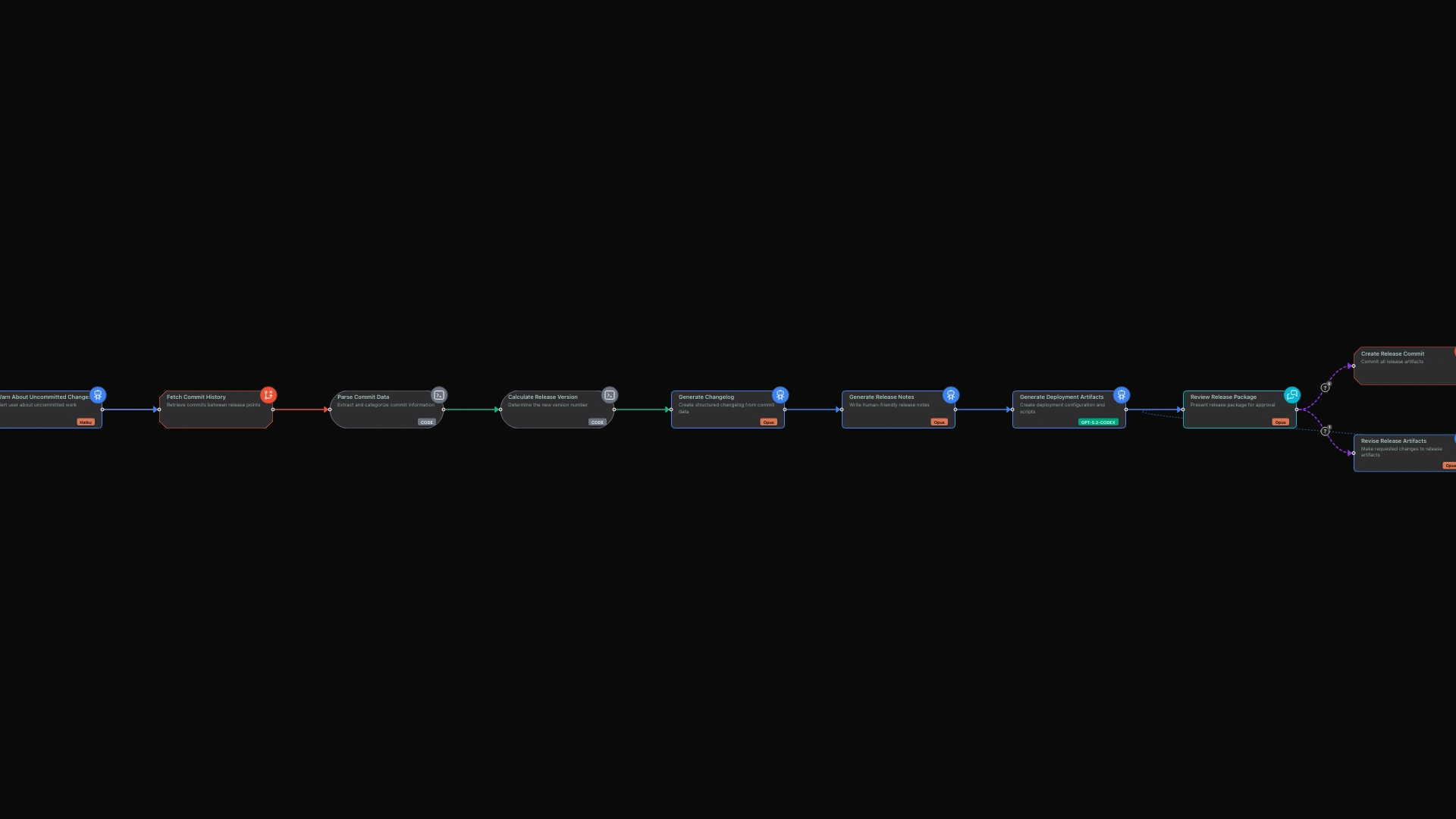
Release day should be a celebration, not a scramble. Yet too often, the final hours before shipping are consumed by frantic documentation: scanning git logs, categorizing commits, writing changelogs, drafting release notes, and assembling deployment checklists. This manual process is tedious, error-prone, and inevitably rushed.
limerIQ transforms release documentation from a last-minute chore into an automated pipeline. By combining intelligent analysis of your commit history with AI-powered content generation, you create a release train that produces publication-ready documentation automatically.
The Release Documentation Problem
Modern software projects generate substantial commit histories between releases. A typical sprint might include dozens of commits spanning features, fixes, refactors, and maintenance tasks. Converting this raw history into useful documentation requires multiple skills:
- Parsing: Understanding commit message conventions and categorizing changes
- Prioritization: Highlighting what matters most to users versus internal changes
- Writing: Transforming technical descriptions into user-friendly language
- Formatting: Adhering to changelog standards like Keep a Changelog
- Verification: Ensuring nothing important is missed
Most teams handle this manually. Someone exports the git log, pastes it into a document, and starts editing. Hours later, they have a changelog that is already stale because three more commits landed during the writing process.
A Better Approach: The Release Pipeline
limerIQ enables you to treat release documentation as a pipeline with discrete stages. Each stage has a specific responsibility and produces outputs that feed downstream stages:
- Configuration: Gather release parameters through conversation
- Repository Analysis: Extract and understand commit history
- Categorization: Structure commits into meaningful categories
- Version Calculation: Determine the appropriate semantic version
- Documentation: Generate changelog and release notes
- Artifacts: Create deployment checklists and manifests
- Review: Present for human approval before finalization
This separation of concerns makes each stage testable and replaceable. If your team uses a different commit convention, you modify the parsing logic. If you need additional artifact types, you add generation steps.
Phase 1: Configuration Through Conversation
The workflow begins with an interactive session to gather release parameters.
The system asks about your release type. Is this a major release with breaking changes? A minor release with new features? A patch release with bug fixes? You can specify a version number or let the system calculate it based on your commits.
It asks about the tag range for this release. From which previous release are you generating documentation? The system can figure this out automatically, but you can override if needed.
You can also provide a codename for the release and specify whether the documentation is for internal teams, external users, or both. These details shape how the release notes are written.
Phase 2: Commit History Analysis
With configuration complete, the workflow analyzes your commit history.
The system extracts all commits in the release range and parses them according to conventional commit format. It identifies features, bug fixes, breaking changes, refactors, documentation updates, and maintenance commits.
This categorization happens consistently. Every commit gets analyzed and placed in the appropriate bucket. Nothing gets missed because you were scrolling too fast through the git log.
The analysis also identifies contributors, giving you a complete picture of who worked on this release and what they contributed.
Phase 3: Semantic Version Calculation
Based on the commit analysis, the workflow determines the appropriate version number.
If you have breaking changes, the major version increments. If you have new features without breaking changes, the minor version increments. If you only have bug fixes, the patch version increments.
This follows semantic versioning strictly. Your version numbers mean something, and that meaning is determined automatically from your commit history, not from someone's best guess.
Phase 4: Changelog Generation
The workflow transforms structured commit data into human-readable documentation.
For the changelog, it follows the Keep a Changelog format. New features go under "Added." Changes and refactors go under "Changed." Bug fixes go under "Fixed." Breaking changes get special callout with migration guidance.
The AI does not just copy commit messages. It rewrites them for clarity, groups related changes, and highlights what matters most. A series of technical commits about "refactor: extract database connection handling" becomes a user-friendly note about improved database reliability.
Phase 5: Release Notes
Separate from the detailed changelog, the workflow generates release notes suitable for publication.
These notes are user-focused, explaining what changed from the user's perspective. They are scannable, with headers, bullets, and highlights for easy reading. They are actionable, including migration steps for any breaking changes.
The release notes also acknowledge contributors, building community goodwill and recognizing the people who made the release happen.
Phase 6: Deployment Artifacts
Beyond documentation, the workflow generates artifacts that support the deployment process.
A version manifest provides machine-readable release information for your CI/CD pipeline. A deployment checklist outlines pre-deployment and post-deployment verification steps. A GitHub release draft is formatted and ready for publishing.
If the release includes breaking changes, a migration guide provides step-by-step instructions for users upgrading from the previous version.
Phase 7: Review and Finalization
The workflow presents the complete release package for your review.
The AI walks you through each artifact: the changelog, release notes, deployment checklist, and any other generated documents. You can ask questions about specific entries, request modifications, or add additional notes.
If something needs to change, you make the request and the system revises the artifacts. Once you approve, the workflow can commit the documentation and create the release tag.
This checkpoint ensures human oversight of the final output. The automation handles the tedious work; you retain control over what gets published.
The Value Proposition
Consistency Across Releases
Every release follows the same documentation structure. Your users know what to expect. Your team knows what to produce. Consistency builds trust.
Speed
What used to take hours now takes minutes. The workflow handles parsing, categorization, writing, and formatting. You review and approve. Time saved on documentation is time available for building.
Accuracy
No more missed commits or miscategorized changes. The workflow analyzes every commit and categorizes it correctly. The complete history is captured, not just what someone remembered to include.
Traceability
A clear audit trail connects commits to documentation. You can trace any changelog entry back to the specific commits that prompted it. This traceability supports compliance requirements and helps when investigating issues.
The Visual Experience
Using the limerIQ visual workflow editor, you can watch the release pipeline progress in real-time. The subway map view shows each phase completing, from configuration through analysis to documentation generation.
You see the commit analysis results, the version calculation, the generated documentation. If anything needs adjustment, you catch it before finalization.
From Manual to Automated
Release documentation should not be the bottleneck before shipping. By encoding your release process into a limerIQ workflow, you transform a manual scramble into a reliable pipeline.
Your next release can be a celebration of what shipped, not a scramble to document it. The release train handles the documentation. You focus on the product.